Hello all,
short explanation, we are facing the challenge that we have a document that includes another document. This included document is updated from time to time and this should be reflected in all existing processes. We have already worked out 2 approaches, one via the import (A12 migration) or the UI. At the moment we are on the version range of 2022.06 until the end of support. My question is, is there actually a best practice or guide on this topic? Please keep in mind that there will be a big break in the next version.
I would like to add some detail.
We have to update “task data” in running processes in a12-camunda in order to keep them synchronous with external data. Hence, these updates do not come from a user, but from an external system. There is no hard need for “online” updates - it would also be acceptable, if the updates are applied from files during service start.
Now we’ve identified several options. Probably the one with the least effort would be to use A12-document migration to update the task documents.
I wonder if this would be enough to make the updated data visible in a user task.
I am afraid it is not. This is my basic understanding of task data in a12-camunda-processes:
- the data displayed in a user task is taken from a process variable
- task documents are only used for ‘list document’ operation
- task documents are created / updated once the corresponding process variable is updated but not vica versa, i.e. an update to of a task document has no effect on the data a user sees in the user task
Is this correct?
What would be alternatives?
Thank you.
Hello @anon55280409 and @anon67142020,
thank you for your post within A12 discourse! We’ve forwarded your request to our workflows team. As they are currently very busy, there may be delays in processing. We apologize for this and hope to be able to provide an answer in a timely manner.
Your discourse team
Hi @anon55280409 and @anon67142020,
We have no documented “best practice” for this. You are correct @anon67142020, which means you’ll have to update both the “task document” and the “process variable”. You can do that using A12 document migration (@MigrationStep) as you mentioned, you’d just have to migrate both.
You may also consider the following alternative for this use case:
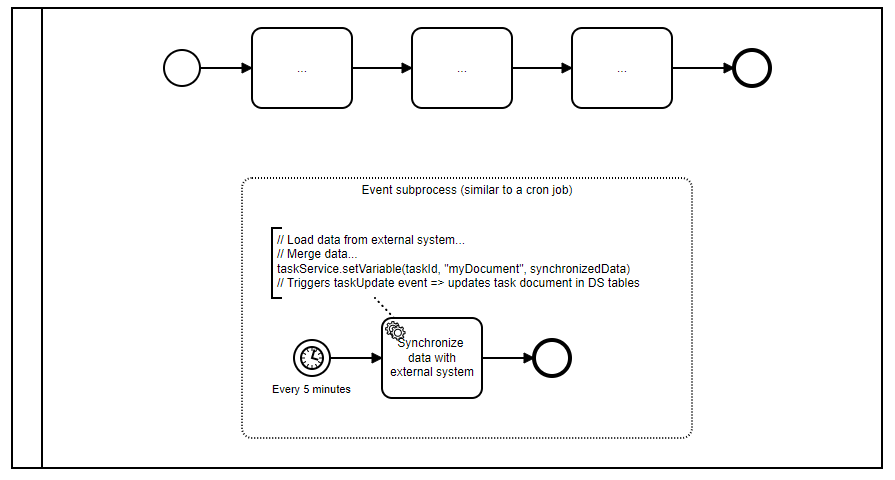
You can update the process variable using Camunda API. Digging into the Camunda code, I’d suggest using TaskService.setVariable(taskId, variableName, value) to make sure that our task update listener is triggered which will cause the “task document” to be updated as well.
Executing this statement could be done using the A12 document migration approach, a cron job or even using an event-based subprocess in your process. The latter would look something like this:
(Unfortunately I cannot upload bpmn files here so just a picture)
Note that these kinds of on-the-fly updates require that the updates from your external system still comply with the document model because the model cannot be migrated here.
Overall, A12 document migration on startup may still be the least effort, especially if you already know it. On the other hand, on-the-fly updates may be nicer and could be enabled by a cron job or subprocess.
Regarding the architecture change in 2023.02: I think this use case here has to be solved independently for now. After the migration to the new architecture, this use case would be easier to solve because we eliminated the data duplication.
Hope that helps!
Best,
Peter