Hello,
I would like to submit an issue we have in our <PROJECT_NAME> project.
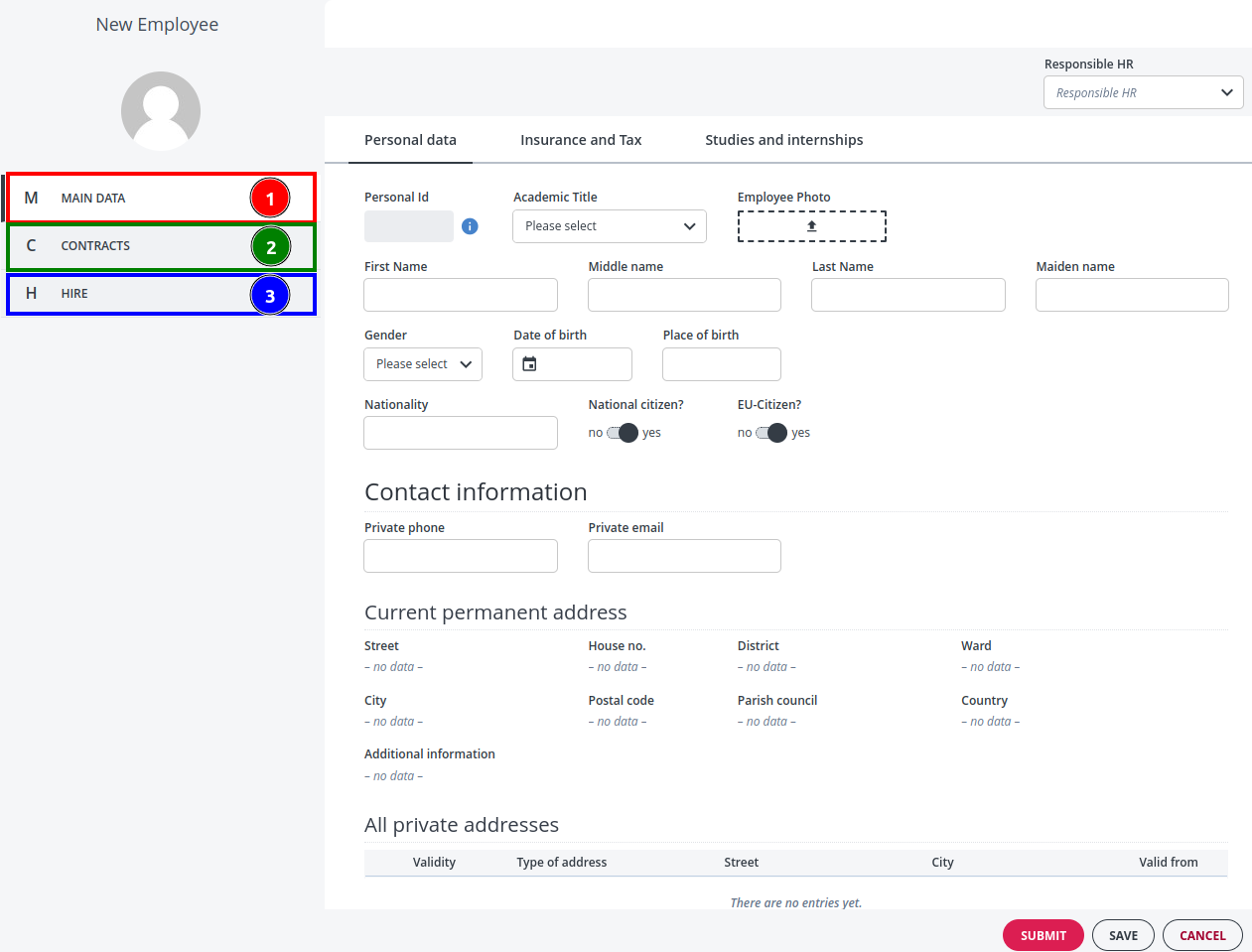
We have an EmployeeCDM which is our data structure containing employee information, contract information and hire information. As you can see in the screenshot, we have customized a vertical navigation where :
- Main Data (1) : open a EmployeeForm (based on EmployeeCDM)
- Contracts (2) : open a ContractForm (based on ContractCDM)
- Hire (3) : open a HireForm (based on EmployeeCDM)
Because of the vertical navigation requirement, we had to create 3 separate forms instead of 1 EmployeeCDMForm, but now we have issues related to validation.
Since there are required fields in each of the 3 forms, it is for instance, not possible to save Main Data if Hire is missing data, and it is also not possible to switch to the Hire form because changing the activity will discard any input Main Data. Basically we are stuck and unable to create a new employee if we apply those validations.
We would like the user to be guided towards the error field in the relevant form in case of missing data in a required field, just like it works for a single form. Does someone know of a way to achieve that ?
Hi @arthur-typed-river,
I’ve not got the complete picture of your complex workspace yet but here are some initial thoughts:
- If you save the EmployeeCDM, I expect the entire CDM to be validated.
- Any unfilled required Fields across the whole CDM will be marked as invalid
- This unfilled required Fields are only found if the document has been created. In other words, if you create a Hire Document whilst working on the EmployeeForm the Hire document will be validated when you save EmployeeCDM and will be invalid.
So I have a few follow-up questions:
- What does EmployeeCDM look like (I assume Main data is the root and the Hire Document is linked by a Relationship Model)
- Do you need to open both the Hire Form and Main Data Form in the CDM context?
- Do you automatically create a Hire Document in any way?
- Are there any Computation Rules on the CDM that might cause the Hire Document to be created by writing Data onto it?
- Assuming the Hire is a child of Main Data, are you opening the Hire Form as a Child Activity?
Hello @malcolm-silver-ice,
Thank you for your answer.
EmployeeCDM.json (22.2 KB)
- Do you need to open both the Hire Form and Main Data Form in the CDM context?
- Do you automatically create a Hire Document in any way?
- Are there any Computation Rules on the CDM that might cause the Hire Document to be created by writing Data onto it?
Yes, to all questions
- Assuming the Hire is a child of Main Data, are you opening the Hire Form as a Child Activity?
No, it is an activity created by customized code.
We initially wanted to validate both forms before submitting data but this seems too complicated with out current modeling (using different forms)…
Hi @arthur-typed-river,
Thanks for the extra information. I think the issue might be caused by:
Now, I’m not a Front-end developer so I’m a little outside my wheelhouse here…but…
If, when switching from the “Main Data” View to the “Hire Form” View you complete the Activity which was started when you were working on the “Main Data”, won’t this try and save the data?
Is it possible to simply switch Views within the same Activity?
Nevertheless, my original comment is true and will need to be addressed too:
You answered that you are automatically creating an empty Hire Document. This means that when saving the CDM, both the “Main Data” and the empty “Hire” Document that you have created will be validated.
Is there any way to adapt the CDM Rules and Custom Code so that when you initially create enter data into Main Data, the Hire Document is not there and that this is valid? Could you also create the Hire Document when switching activities so that any required Fields are only evaluated when you are actually looking at that Form?
We wanted to make sure an employee would have an Hire Document but this is incompatible with our custom code so we ended up choosing this solution.
Could you also create the Hire Document when switching activities so that any required Fields are only evaluated when you are actually looking at that Form?
We create the Hire Document later.
Thank you