Hi there,
I am upgrading my application from 2023.06 to 2024.06 which includes the renaming of various spring properties in user-management. In my case, specifically the properties under mgmtp.a12.uaa.user-management.idp-registration.[{idp-registration-key}] cause issues when the name of my realm deviates from the default name “user-management” or it is unclear to me how to configure it correctly.
In my case, the realm is called “geta12” and i set the following spring properties accordingly:
mgmtp.a12.uaa.user-management.idp-registration.[geta12].realm-name=geta12
mgmtp.a12.uaa.user-management.idp-registration.[geta12].url=<my-keycloak-url>
mgmtp.a12.uaa.user-management.idp-registration.[geta12].account.url=<my-account-url>
mgmtp.a12.uaa.user-management.idp-registration.[geta12].idp-extension-technical.username=<my-idp-username>
mgmtp.a12.uaa.user-management.idp-registration.[geta12].technical.username=<my-username>
mgmtp.a12.uaa.user-management.idp-registration.[geta12].technical.password=<my-password>
In my case, those properties must be integrated as env variables, so the actual properties that are set are the following:
MGMTP_A12_UAA_USERMANAGEMENT_IDPREGISTRATION__GETA12__REALMNAME=geta12
MGMTP_A12_UAA_USERMANAGEMENT_IDPREGISTRATION__GETA12__URL=<my-keycloak-url>
MGMTP_A12_UAA_USERMANAGEMENT_IDPREGISTRATION__GETA12__ACCOUNT_URL=<my-account-url>
MGMTP_A12_UAA_USERMANAGEMENT_IDPREGISTRATION__GETA12__IDPEXTENSIONTECHNICAL_USERNAME=<my-idp-username>
MGMTP_A12_UAA_USERMANAGEMENT_IDPREGISTRATION__GETA12__USERMANAGEMENTTECHNICAL_USERNAME=<my-username>
MGMTP_A12_UAA_USERMANAGEMENT_IDPREGISTRATION__GETA12__USERMANAGEMENTTECHNICAL_PASSWORD=<my-password>
Upon startup, the properties of realm “geta12” are applied correctly in the idp-registration. However, additionally to those properties, User-Management also seems to expect the properties to be set for “user-management” which causes the exception Technical Users Configuration Data Is Not Valid:
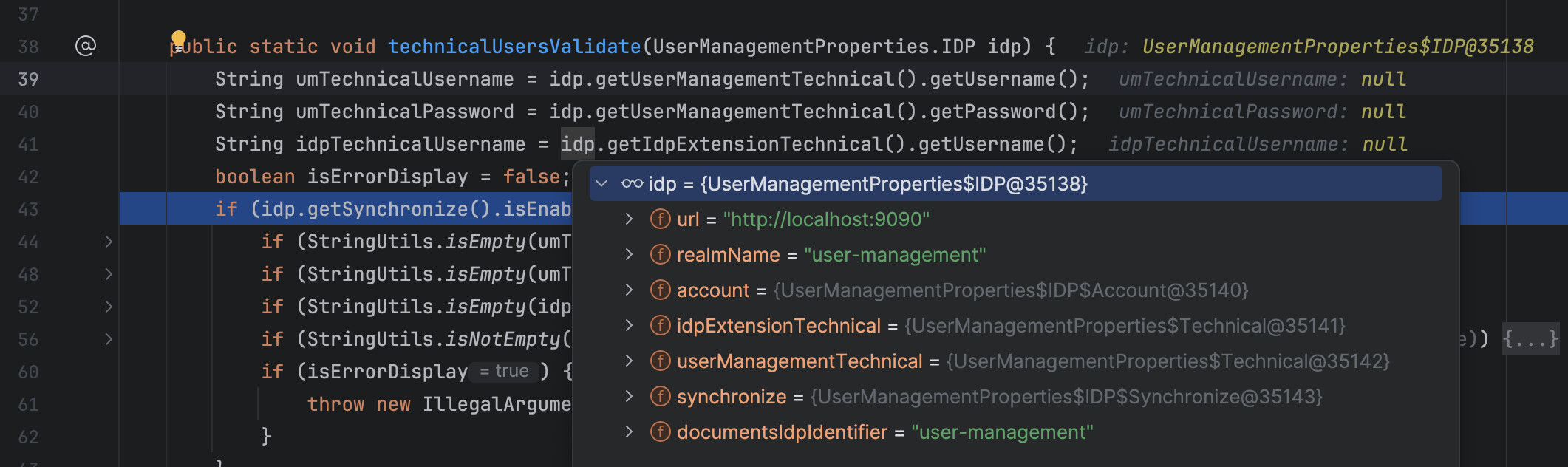
The values for “url” and “realmName”, etc must come from default values outside of my configurations that i wasn’t able to locate/delete.
The realm-name only deviates from the default “user-management” in my production environments. In development environments (& locally), the default “user-management” is used, avoiding any sort of exception.
Please let me know if there is any way i can avoid this exception with a realm that does not use the default “user-management”.
Thank you!
