A regular overview model can have their columns set to be resized. So can the tables for repeatable groups. For the SelectedItems Overview models for relationships, I have some overview models that do have the expanded features available and some that don’t. I cannot find a reason why.
It seems the reason is the SelectedItems_OMs that are labeled “Overviews for Bindings” don’t have it, but “regular” SelectedItems_OMs do?
Your own answer is correct, and the restriction is in the model editor only, not in the engine.
An Overview Model created from the Binding Editor with the plus icon opens in a reduced editor:
The settings you can make in this special Overview Model Editor are limited to the settings that are used for the display of the Binding and are therefore available in the Relationship UI.
(Overview Models and Link Form Models). The reduced editor also opens when you open such a model from the Workspace Explorer, so Enable Columns Resize stays unreachable for the whole lifetime of that model. A regular Overview Model keeps the full editor, which is why you see the checkbox on some of your Selected Items Overview Models and not on others.
The engine itself supports it in both panes. The Overview Engine derives its column resizing options from enableColumnsResize in the Overview Model configuration, and both the Binding dual pane and the Relationship UI Model panes render the regular Overview Engine with the referenced Overview Model, whereby the setting is not filtered out on the way. Therefore two workarounds work today:
- Model the Selected Items Overview as a regular Overview Model in the Simple Model Editor, enable Columns Resize there, and select it in the Binding Editor. The Binding Editor accepts any Overview Model that references the correct Document Model.
- Set
enableColumnsResizein the Overview Model JSON directly. This is the cheaper option for models you already created in the Binding Editor. However, the setting is not visible in the reduced editor afterwards, which makes it easy to lose.
With the Relationship UI Model in 2026.06 the problem disappears, because its Overview Model Wizard generates a regular Overview Model plus a backing Query Model instead of a Binding Overview Model, and those are edited like any other Overview Model. Hint: if you are on 2026.06 and still get the reduced editor, that Relationship UI is still modeled as a Binding in the Form Model and not yet migrated to a Relationship UI Model.
Note: two limitations remain in both cases. Enabling columns resize disables the responsive column widths, so all columns get a fixed width. In addition, the resized widths are not persisted for the Relationship UI panes, because the components do not handle the Overview Engine’s column width change event, whereby the widths fall back to the modeled values when a pane is re-rendered.
I migrated all models just by opening the old ones in the new editor and migrated them all through a button push. Should the expectation have been, that all my overviews should have migrated according to what the 2026.06-wizard would have provided as output? Or do I need to change them myself?
And you state “Enabling columns resize disables the responsive column widths, so all columns get a fixed width.” This does not seem to be the case for at least a regular overview where I have widths that I initially set in the model and can still adapt them in the UI.

Or did I misunderstand this point?
I migrated all models just by opening the old ones in the new editor and migrated them all through a button push. Should the expectation have been, that all my overviews should have migrated according to what the 2026.06-wizard would have provided as output? Or do I need to change them myself?
The tool updated the models to the 2026.06 versions. It does not convert or transform models into another type.
And you state “Enabling columns resize disables the responsive column widths, so all columns get a fixed width.” This does not seem to be the case for at least a regular overview where I have widths that I initially set in the model and can still adapt them in the UI.
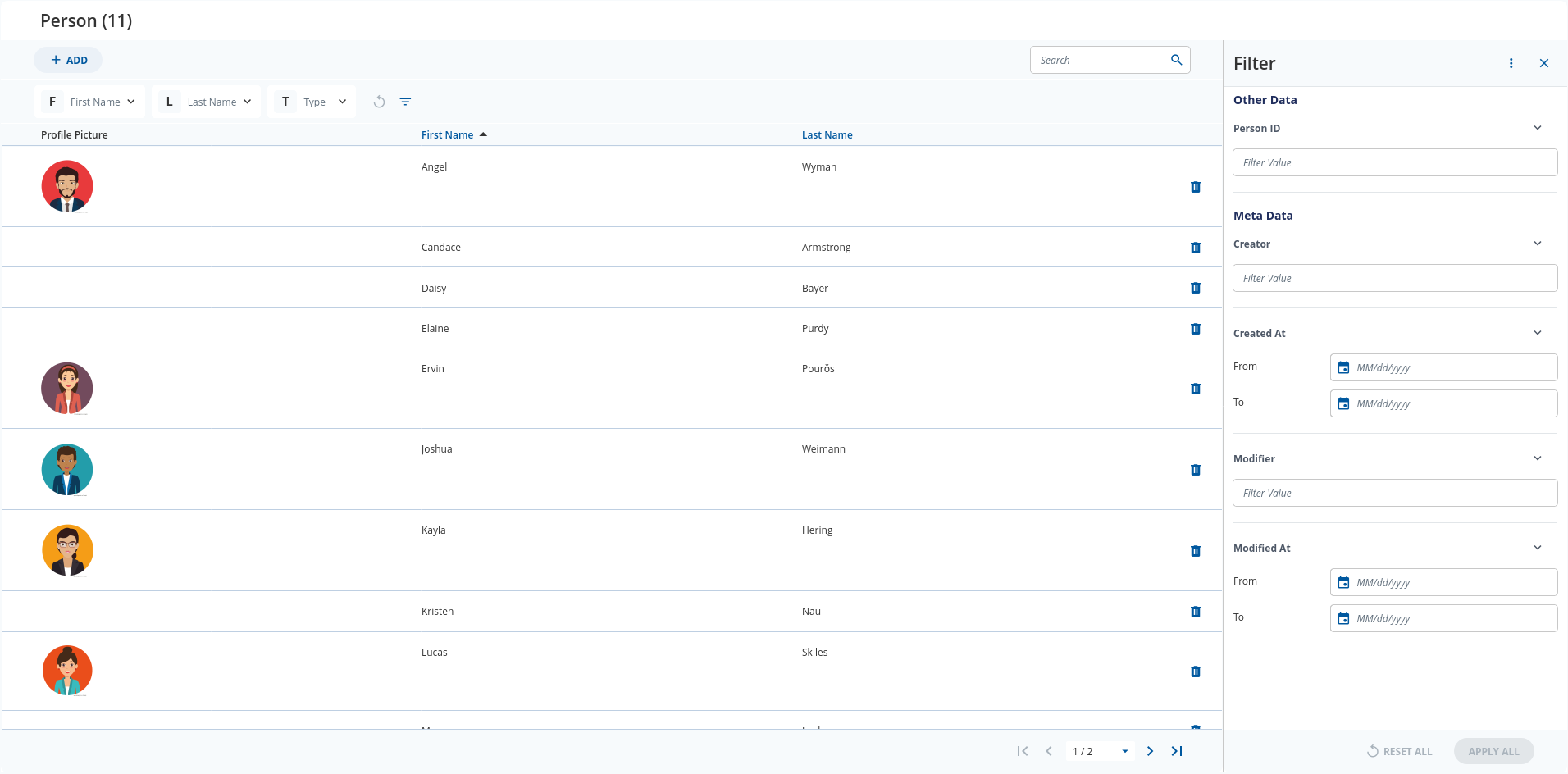
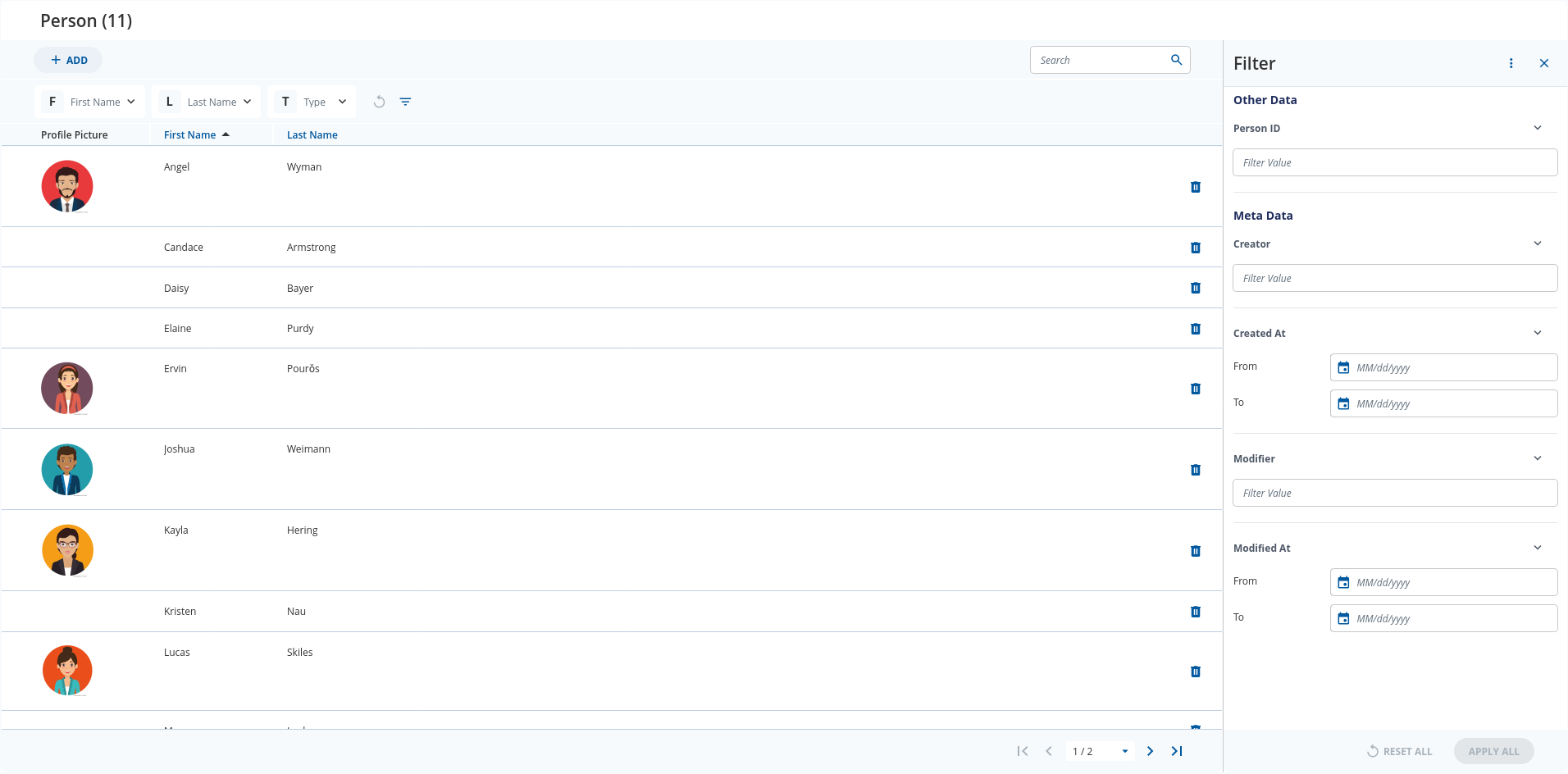
Here is a side by side comparison:
Without
With
Then why does my latest screenshot show both different width columns when entering the overview (Sicherheitsstufe is way slimmer than Betriebsstätte) AND has the option for column width adaptation?
The wording in the documentation is about the responsive feature and not about equal widths. Fixed width means that a column keeps its modeled width independent of the available space, whereby different columns still have different widths, because each column uses its own width value from the Overview Model.
By default, column widths in Overview Engine are responsive, expanding to fill the remaining space based on their defined values in the model. Therefore, a column’s width may be different depending on the browser resolution. However, if fixed width is enabled for the column, the column width will be fixed at
width* 150px (widthis the value defined in the model).
The two screenshots above show exactly that. First Name and Last Name are modeled with the same widths in both cases. Without columns resize they expand until the table is filled. With columns resize they stay at their modeled widths and the space to the right of Last Name is left empty.
Therefore, your screenshot is the expected behavior. Sicherheitsstufe is slimmer than Betriebsstätte because their modeled width values differ, and the resize handles are there because you enabled the setting. To see what you actually lose, make the browser window narrower or wider: with Enable Columns Resize the columns keep their width, without it they grow and shrink with the available space.