This post describes a handy solution for an issue I ran into in modelling CDMs and CFMs for heterogeneous data in a customer project. I hope it is helpful, in case anyone runs into a similar situation.
Issue
In the Project there are three document models for locations:
- The abstract supertype “Location_DM”
- The first subtype, a model for data imported from a single source of truth, let’s call it “LocationST_DM” which can not be deleted and no imported field can be modified
- The second subtype, a model for manually implemented and maintained locations “LocationNonST_DM”
The supertype is linked to other DMs via relationships, let’s call them Related1_DM, Related2_DM and Related3_DM for this example.
In practice, the data of Related1-3_DM is tightly connected to the location, and should often be displayed along side it. Therefore, CDMs have to be build for the Location_DM subtypes to serve as the basis for CFMs.
My mistake: I started by building a CDM and CFM for Location_DM, only to realize afterward, that the CDM might be useful as the basis for an OM down the line, but since it’s an abstract supertype, the Composed Form Model was useless, as long as it had Location_DM as its corresponding DM.
The result: I would have to build two more CDMs for the subtypes from scratch (even though in this case they are identical, except for one calculation) and two more CFMs, which are also identical except for some read only fields. That seemed like a lot of busywork to arrive at 2 more models that were extremely similar to the ones I had already built.
Implementing the new CDMs
Failed Attempts
At first I tried to just change the root model in the editor but ran into the problem, that I could neither edit the annotation defining the root document (cdm.queryRoot) because of an error, nor the include of the root DM in the model tree the error told me to adjust, because the details were all read-only.
The second attempt was to copy the JSON of the supertype CDM, and replace all mentions of Location_DM with e.g. LocationST_DM and rename every …_CDM entry in the same manner. This resulted in a new CDM I could open in the SME, but for some reason, the root group was displayed like a classical include and not like a CDM root, with according error messages.
Solution
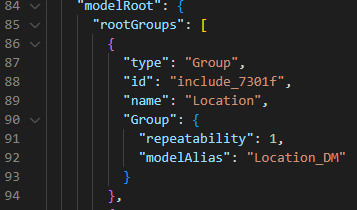
To fix the root group issue, I created a CDM LocationSTWithRelated_CDM using the SME, but left it empty apart from its root. I then opened the JSON and went to the line which defines the “modelRoot” (see picture). I went to the same spot in the LocationWithRelated_DM, copied everything after the first Group an pasted it in the newly created CDM. This time the result was a functional model, with all inserted relationships and added calculations intact.
Implementing the new CFMs
For the new form models, I realized I could simply create a copy of the existing one for the LocationWithRelated_CDM and change the document model in the settings to the new LocationSTWithRelated_CDM. This left the structure intact, and all controls that were originated from one of the Related_DMs were fully functional. The only thing left that required some manual labor was replacing the invalid controls previously from Location_DM with those from LocaitonST_DM.
Summary
By using a little copy-and-paste in the JSONs and copying and changing the root models of the FMs, I avoided implementing virtually the same models three separate times manually, and saved multiple hours in the process. Can heartily recommend this approach to anyone in a similar situation.

