Hi, when uploading test data into the SME Form Modeler Preview, I get following toast message:

But where is this console? How can I access it?? it would of course be helpful to know more about the cause of the error…
I’m quite surprised that you have seen this message as you can load basically any json into the Form Model Preview.
I tested in the 2023.06-ext3 version (SME 10.3.1) and I could:
The only way that I saw this error was if I had a broken json with an invalid structure. I manually deleted the last } from my json. This was shown to me when I modified it in Visual Studio Code as the file was marked red due to this invalid data structure.
If you always generate test data using the Form Model Preview or Test Data Generator you should not see the error you have shown as you will always have a valid json structure.
Thanks for your answer. I’m surprised to see that a totally non-matching JSON may be imported!
I had wroten the JSON (manually) long ago.
I have found the error: my file was perfectly well formed JSON (the IDE didn’t show any error), but one field was (long ago) a number, and now it’s a DateFragment “YYYY”.
So I just had to add quotes around the number in my JSON:
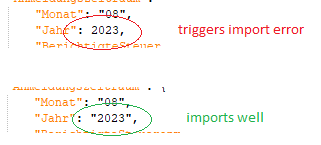
Maybe anyway the error message could be improved, and no longer refer to a console that is not accessible?
Here the problem seemed to be that the path/field did match, but not the data type…
Thanks for the update.
I agree that the error should be more informative and have created a ticket for the SME team (A12SME-3812).