Is it possible to “print” relationships? Making a print model requires you to select a document model, but a relationship is distributed across two document models, so it seems that currently creating a print model that shows the information from both across document models is not possible?
I guess, one would have to potentially create a separate model which has all the fields in there and then the back-end would gather all the relevant information from the indidivual document models and feed the newly assembled document-json as input, together with the newly created overarching model in order to print everything into one PDF.
Hey @jasper-silent-root,
you can use a Composed Document Model and the Data Services methods to compile the respective CDDs in the backend and feed it into the Print Engine.
In 2025.06 you can model a Print Model on a CDM. The modeling of the Print Model works just as on a regular Document Model.
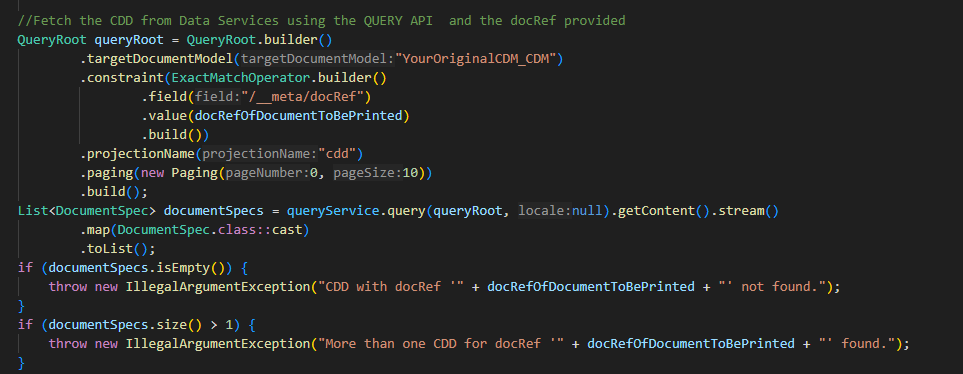
To fetch the compiled CDD document from Data Services, you can use code like this in 2025.06:
where docRefOfDocumentToBePrinted is the variable that stores the docRef of the Root Document of the CDD you want to print.
(In 2024.06 you can use method LIST_CDDS in an equal manner.)
You then just have to feed this document into Print Engine together with the Print Model you modeled based on the CDM.
And how would the CDD know which parts of the relationship to compose? Say I have 1 person, who works on Teams 4, 7 and 14 of the 15 Teams that are in the database. How would I fill my CDM with
Person[1]: {
Team[1]: info from Team nr 4 in the DB,
Team[2]: info from Team nr 7 in the DB,
Team[3]: info from Team nr 14 in the DB
}
?
This works via the links the user creates in the application.
So the user opens a form for a Person and has a Relationship UIs/Binding in there, where they can select Teams. All the Teams that are shown on the right hand side of the Binding in the Selected Items list, are linked to the Person.
Data Services does the same when compiling the CDD: it searches for the Root Document (the Person in question) and retrieves all the links (together with the Additional Link Field Documents) and fills this into the CDM structure, so that the CDD will contain the data of the Root Document (Person) and all linked Team documents.
Ok, that seems like a good way forward!