We’re firmly in workaround territory here.
That being said, there are still some options available to you before you turn to custom code. The attached models end up with this:
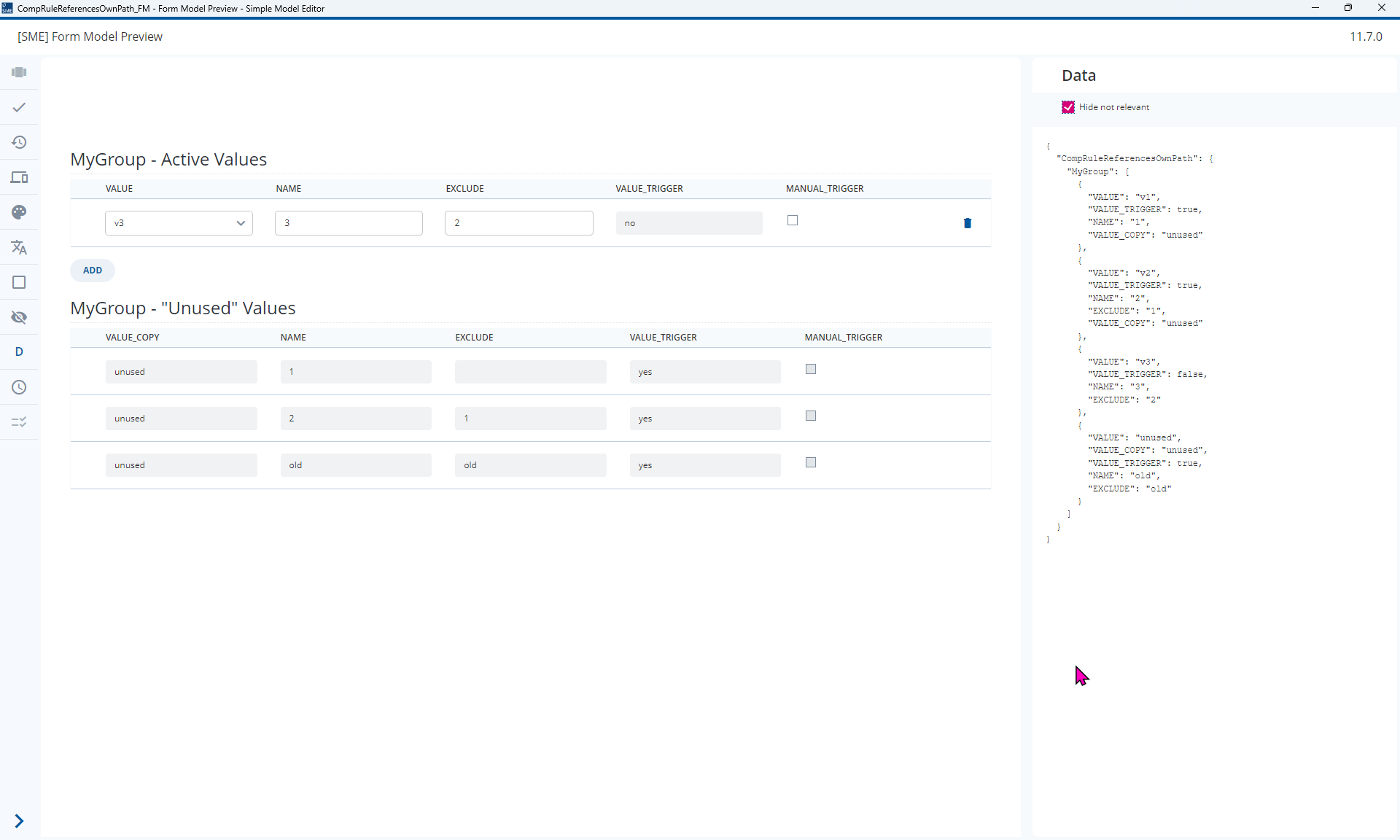
1. Use a manual trigger
Similar to the discussion in Make inline-repeat line readonly after saving you could use a manual trigger. A validation rule can be used to check when the Manual Trigger is not set and then a dependency can set the VALUE to “unused”
GroupFilled(RuleGroup)
And FieldValueIncludedInValueList(VALUE, "v1", "v2", "v3")
And AtLeastOneFieldValueIncludedInValueList(../MyGroup*/VALUE Having [EXCLUDE]
    == [$NAME]
    And CurrentRepetition(RuleGroup) != CurrentRepetition($RuleGroup) In "v1", "v2", "v3")
And FieldNotFilled(MANUAL_TRIGGER)
2. Use Two Fields
Similar to the discussion in Computed fields readonly even with unfulfilled precondition you can use two fields. This is like you have suggested in your answer but the difference is that this second field does not trigger anything, it is simply displayed under a certain set of conditions.
3. Use Filter Expressions
Similar to the discussion in Filter Expression for repeats based on FieldFilled you can use filter expressions to specify which data is shown. As @tim-deep-thread points out, you should be aware that:
Proposed Solution
- Model two repeats and use Filter Expressions as suggested in 3.
- Set the Filter Expression,
[VALUE_TRIGGER] = "false"for the active rows based on the inverse Precondition
NoFieldValueIncludedInValueList(../MyGroup*/VALUE Having [EXCLUDE] == [$NAME] And
CurrentRepetition(RuleGroup) != CurrentRepetition($RuleGroup)
In "v1", "v2", "v3")
- Set the Filter Expression
[VALUE_TRIGGER] = "true"for the deactivated rows using the Precondition that you proposed.
AtLeastOneFieldValueIncludedInValueList(../MyGroup*/VALUE Having [EXCLUDE] == [$NAME] And
CurrentRepetition(RuleGroup) != CurrentRepetition($RuleGroup)
In "v1", "v2", "v3")
- Visualize the Computed Value as suggested in 2.
This leads to the rows being automatically deactivated. However, deactivated rows can also deactivate other (newer) rows. It’s not clear if this is desired or not. You can adapt VALUE_TRIGGERComp to something like CurrentRepetition(RuleGroup) > CurrentRepetition($RuleGroup) to restrict the deactivation to deactivation by newer rows.
Equally, switching to the manual trigger approach would also allow you to set VALUE == "unused" and then also reference this in the Rules as I have done in the attached models which leads to an extension to your precondition:
(FieldValueIncludedInValueList(VALUE, "v1", "v2", "v3")
And AtLeastOneFieldValueIncludedInValueList(../MyGroup*/VALUE Having [EXCLUDE]
    == [$NAME]
    And CurrentRepetition(RuleGroup) != CurrentRepetition($RuleGroup) In "v1", "v2", "v3"))
OR [VALUE] == "unused"
2024.06-ext6 models
CompRuleReferencesOwnPath_DM.json (10.8 KB)
CompRuleReferencesOwnPath_FM.json (5.0 KB)