Model Relationships to DomainUserManagement

Hi,
Has anyone tried integrating the UAA user model DomainUserManagement into their data modeling?
I have a model called Project_DM, which should have some optional many-to-one relationships to users — as Assignee, Owner, and Executor.

To achieve this, I first downloaded the DomainUserManagement user model from the A12 documentation and integrated it into the SME. During testing, I encountered two issues:

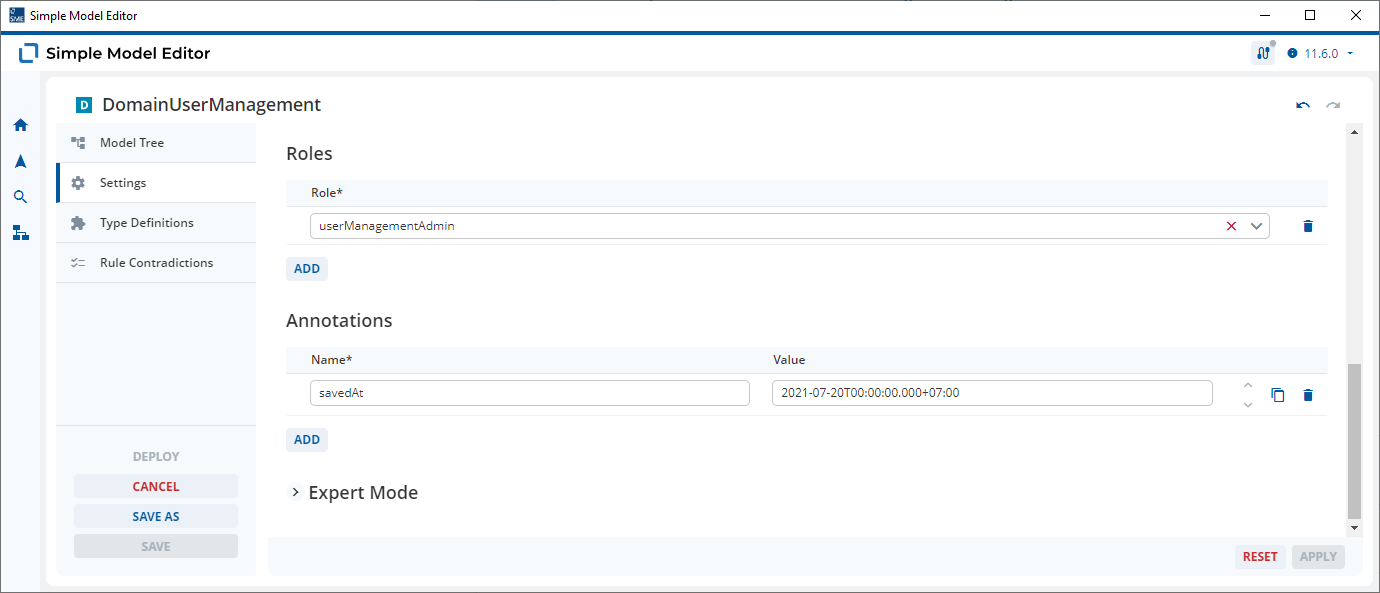
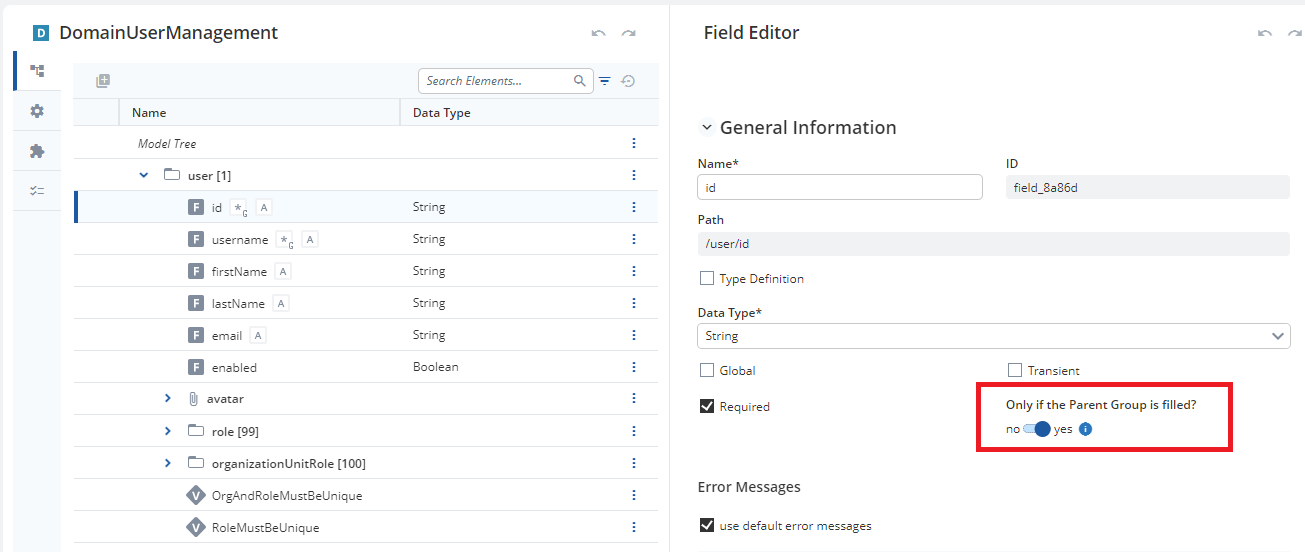
  1. The required rules for the fields id and username are always enforced. As a result, I wasn’t able to save my document without selecting Assignee, Owner, and Executor. I was only able to resolve this after setting “Only if the Parent Group is filled?” to TRUE.
    I thought this flag was only relevant for Repeats, not for Relationships. In the case of a Relationship, I don’t understand why the required rules are enforced when no related document has been selected.
  2. Only users with the role userManagementAdmin can list all users. All other users can only see or select themselves.
    Is there a role I can assign to my users that allows them to list all or specific users — for example, all users who have a specific role like “ERP_User”?I don’t want to wrap/include or relate the user data model into a separate employee model just to preselect the users that should appear in the relationship select box. I feel that would be unnecessary overhead to maintain each user manually like that. Assigning a role should be sufficient in my opinion.
Hi @foued-soft-queue

The short answer is, no, I’ve never tried to do this… but I’m still going to try and help you. :crossed_fingers:

The DomainUserManagement Document Model that you downloaded model from the UAA documentation is modeled so that you can create User documents. These User documents represent all the Users of the application.

Point 1
The id and username Fields are set as required in this Document Model as all User of your application must have a unique id and a username which they use to log in to the application.

I would not recommmend setting "Only if the the Parent Group is filled?" to "Yes" as this means:

  1. You can save a blank User Document
  2. You must enter an id and username as soon as any Field or Repeat is filled

I see no benefit to saving blank User Documents.

The modeling of these required fields in DomainUserManagement has nothing to do with their relationship to a Role or any other Document. These required flags simply ensure that each User that you create can be identified with a id and username.

Point 2
The Users created based on DomainUserManagement can then be assigned a Role, for example userManagementAdmin. These Roles can be used to determine which access rights a user has in relation to certain Documents in your database.

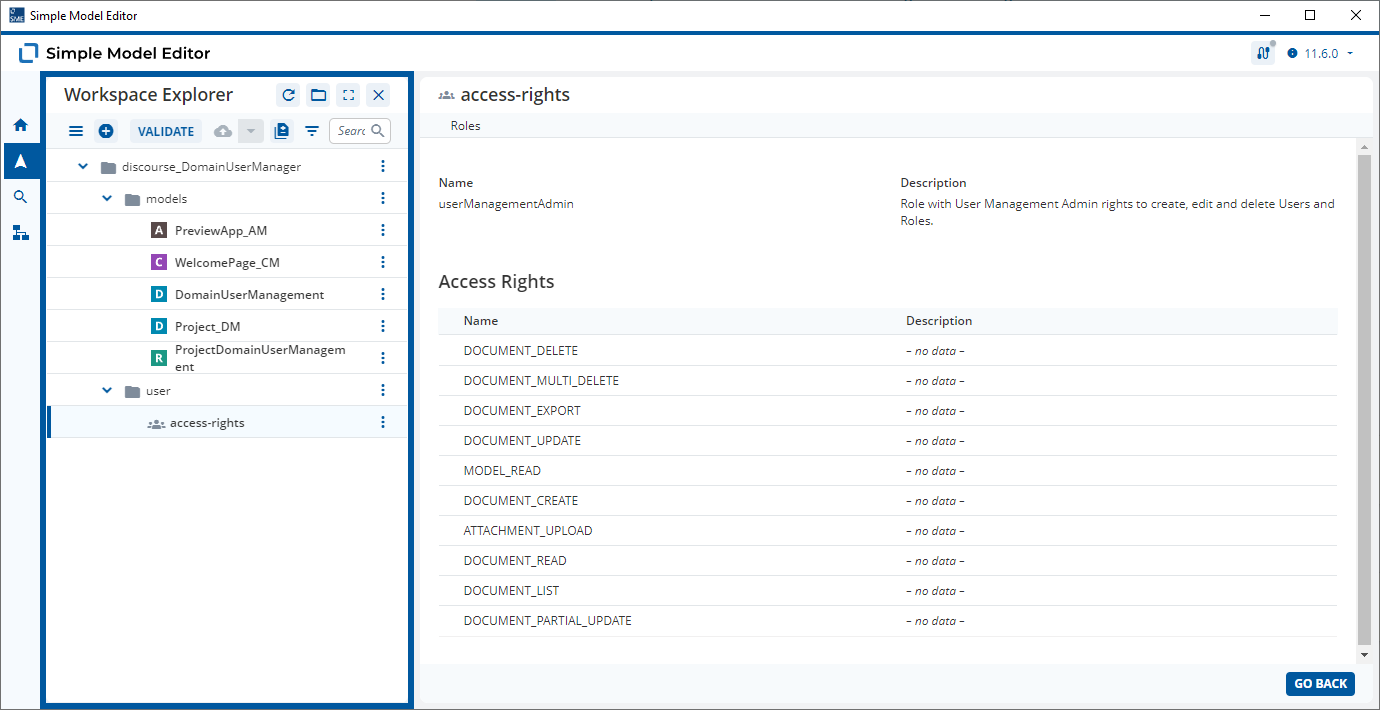
In this case, DomainUserManagement Document Model has the role userManagementAdmin.


This means that any User with the Role userManagementAdmin has the following rights relating to all User Documents (per-default when using the Preview App):

It’s the DOCUMENT_LIST Access Right which allows users with the role userManagementAdmin to list all users.

Assigning Access Rights by Roles (Role-Based Access Control, RBAC) is an all or nothing approach which does not allow you to assign access rights to some of the Documents based on a particular Document Model. A12 allows you to use Attribute-Based Access Control (ABAC) which allows a lot more configuration.

Have a look at the documentation links above. If you have any questions relating to RBAC or ABAC, please create a new thread in the UAA category.

Hi @malcolm-silver-ice,

Thank you for your quick and detailed reply.

First of all, let me briefly explain what I’m currently working on.
The whole thing is intended to become a new internal ERP application, where users (some of our colleagues) can log in and assign projects to themselves or to others.
A project in this context is similar to a ticket in JIRA. However, while JIRA typically uses an entire space for a project and its associated customer, my application assigns each project to a single customer and up to three users: Owner, Assignee, and Executor.

Ideally, users are retrieved from Active Directory and assigned a specific role, such as ERP_User, by a designated User Manager.
Anyone with this role can log in to the application and is allowed to create, edit, and manage projects.

At this stage, I’m working exclusively with the SME and the Preview App, trying to progress the data modeling as far as possible.
I’m aware that certain aspects will only be achievable programmatically, but we already want to understand what might be possible and how it could potentially be achieved.

I’ll try to address both points in more detail in two separate posts.

Point 1
I fully agree with you that the temporary workaround I implemented is not ideal.
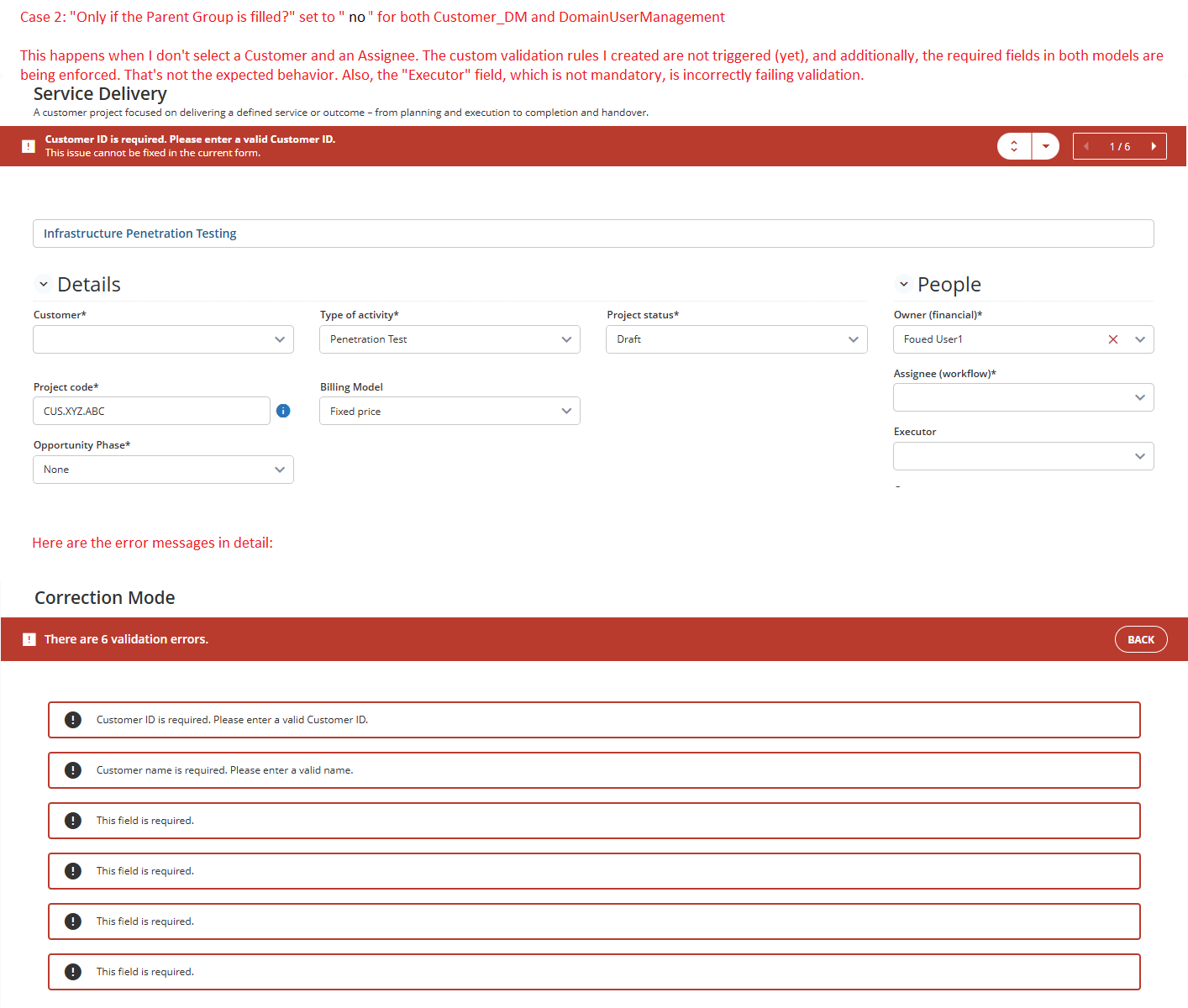
However, in my case, the Required fields/rules for both DomainUserManagement and Customer_DM are automatically validated/enforced when I set "Only if the Parent Group is filled?" to "No", even if no related document has been selected.
Either I’ve misconfigured something in the models or relationships, or there’s something not working correctly with the validation — which, to be honest, I don’t really believe.

Just to clarify: I’m not talking about creating new documents here.

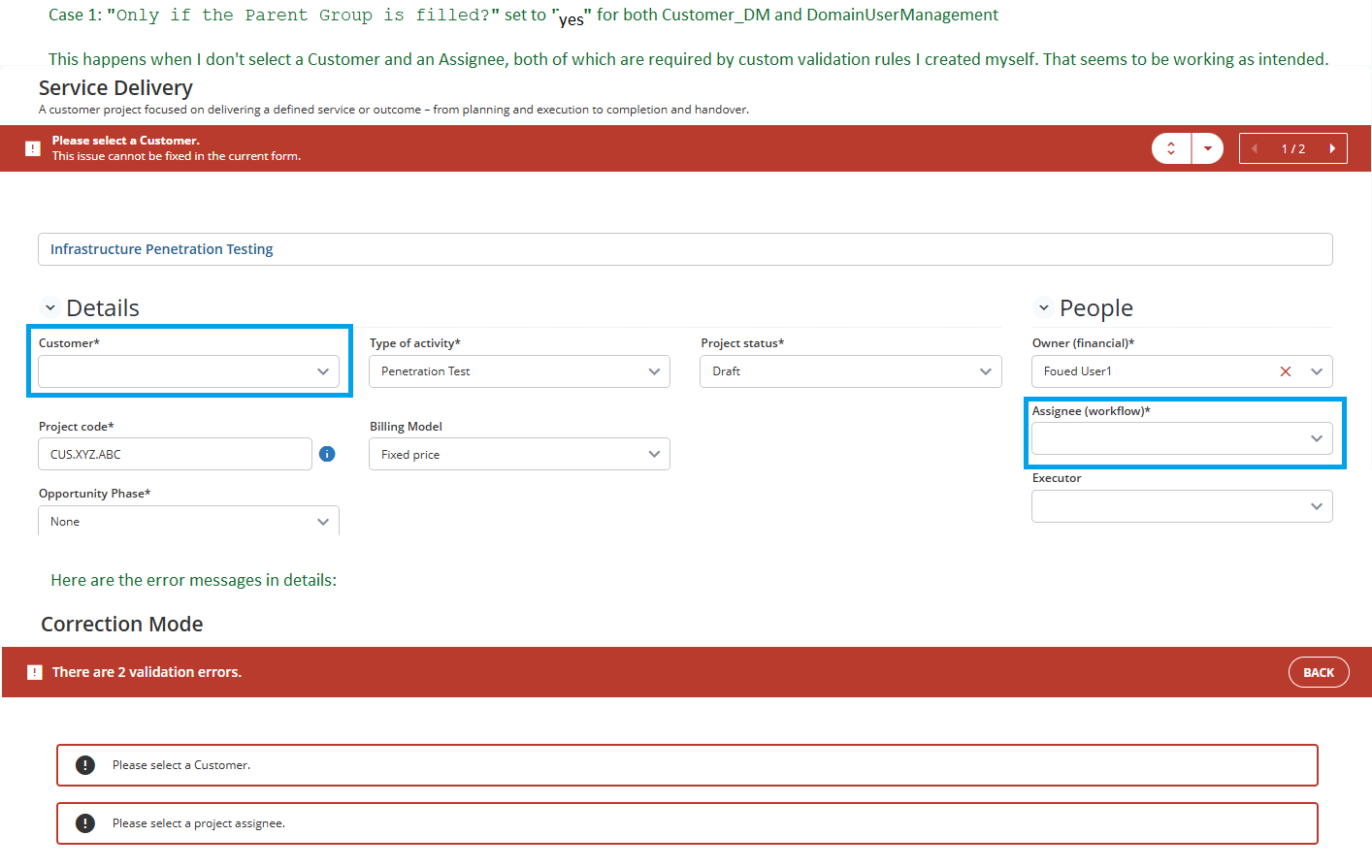
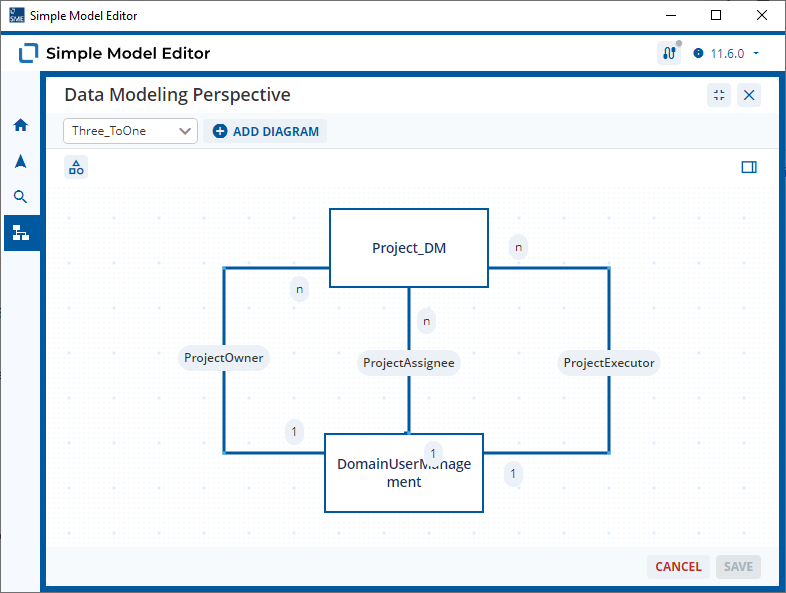
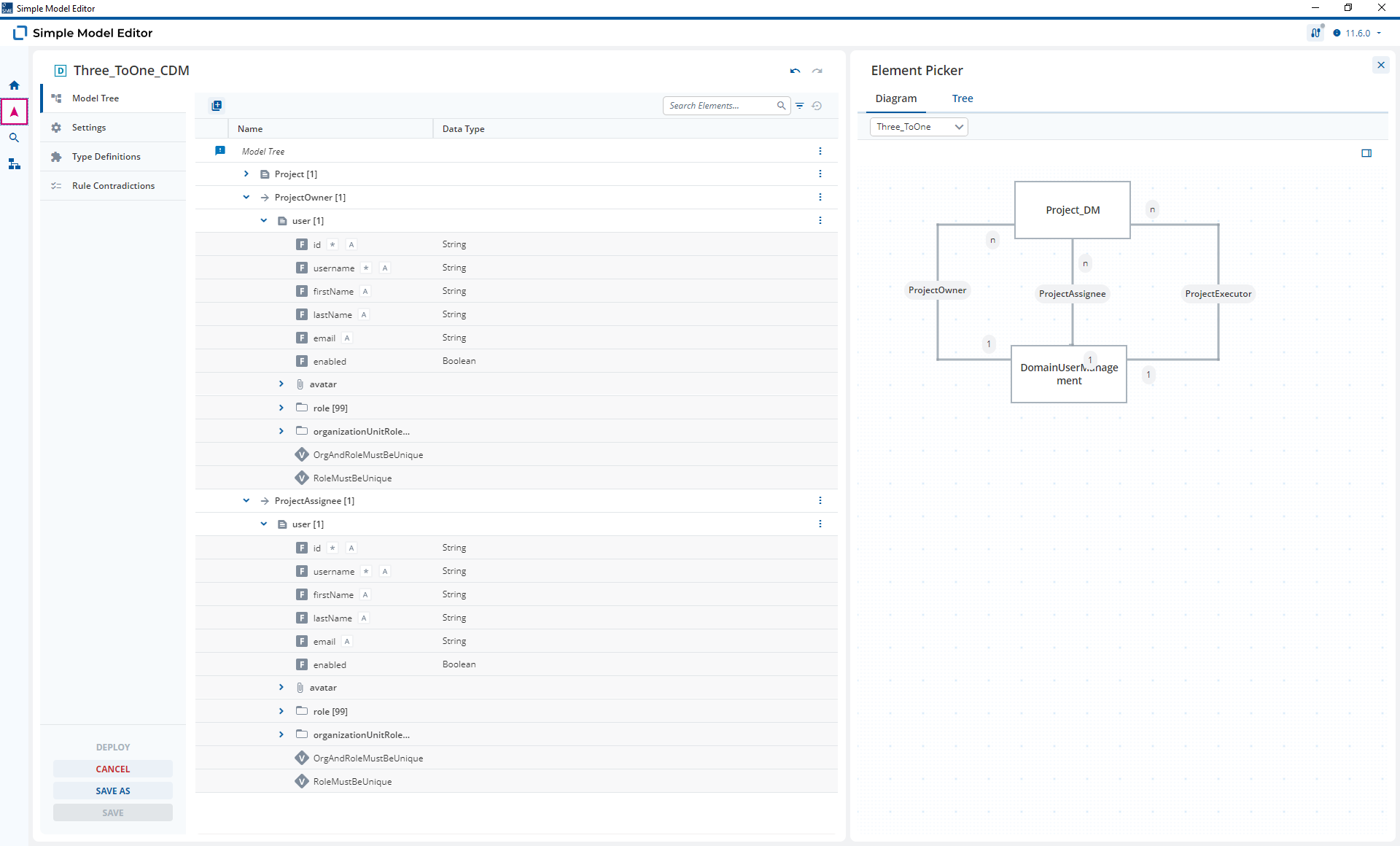
I hope the two attached images help illustrate the issue more clearly.


Point 2

Thank you for the links regarding RBAC and ABAC. I assume that defining roles in combination with access rights is not such easy thing and requires careful planning :zany_face:

It also appears for me that the role userManagementAdmin is predefined in UAA and necessary not only for managing users but also for retrieving them. UAA seems to enforce access to its API using the user-management-authorization.json policy file.

I found this section particularly interesting:

{
  "name": "User Document Reading Policy",
  "description": "The user document belongs to the currently logged-in user",
  "target": "true",
  "rules": [
    "containsAnyRole('userManagementAdmin') || #resource == principal.username"
  ]
}

I believe this explains the behavior well: only users with the userManagementAdmin role can read all users (including “technical” users). Other users can only see themselves.

To address this, I may need to introduce a new role such as ERP_User_Reader with access rights MODEL_READ, DOCUMENT_READ and DOCUMENT_LIST , which would be allowed to list / read users having the basic ERP_User role. So the new role ERP_User_Reader has to be added to DomainUserManagement and also assigned to every user with ERP_User role. Then I have to customize the configuration of user-management-authorization.json. However, I realize this goes beyond simple modeling and likely requires a separate, dedicated thread around UAA.

What do you think?

P.S. I’m a bit confused — the use case I’m defining here isn’t really an edge case; it actually seems quite typical, doesn’t it?

Hi @foued-soft-queue,

Thanks for the extra information and screenshots.

Are you using a CDM? This is the only reason that I can think of that your Fields on DomainUserManagement would be validated when creating a new Project Document.

And does your Model Graph look like this?

If it does, then the behavior that you see makes perfect sense. You have modeled a CDM with lots of non-repeatable required Fields. These will be validated when you try and save the Project in this CDM context.

If you want to continue with this modeling approach you need to model a validation rule in the CDM that checks if the relationship link has been established.

  1. Remove the required flag from DomainUserManagement
  2. Model a FieldNotFilled(username) And FieldFilled(t_docRef) type Validation Rule in the CDM.

Check the Relationship Modeling Documentation for more information.

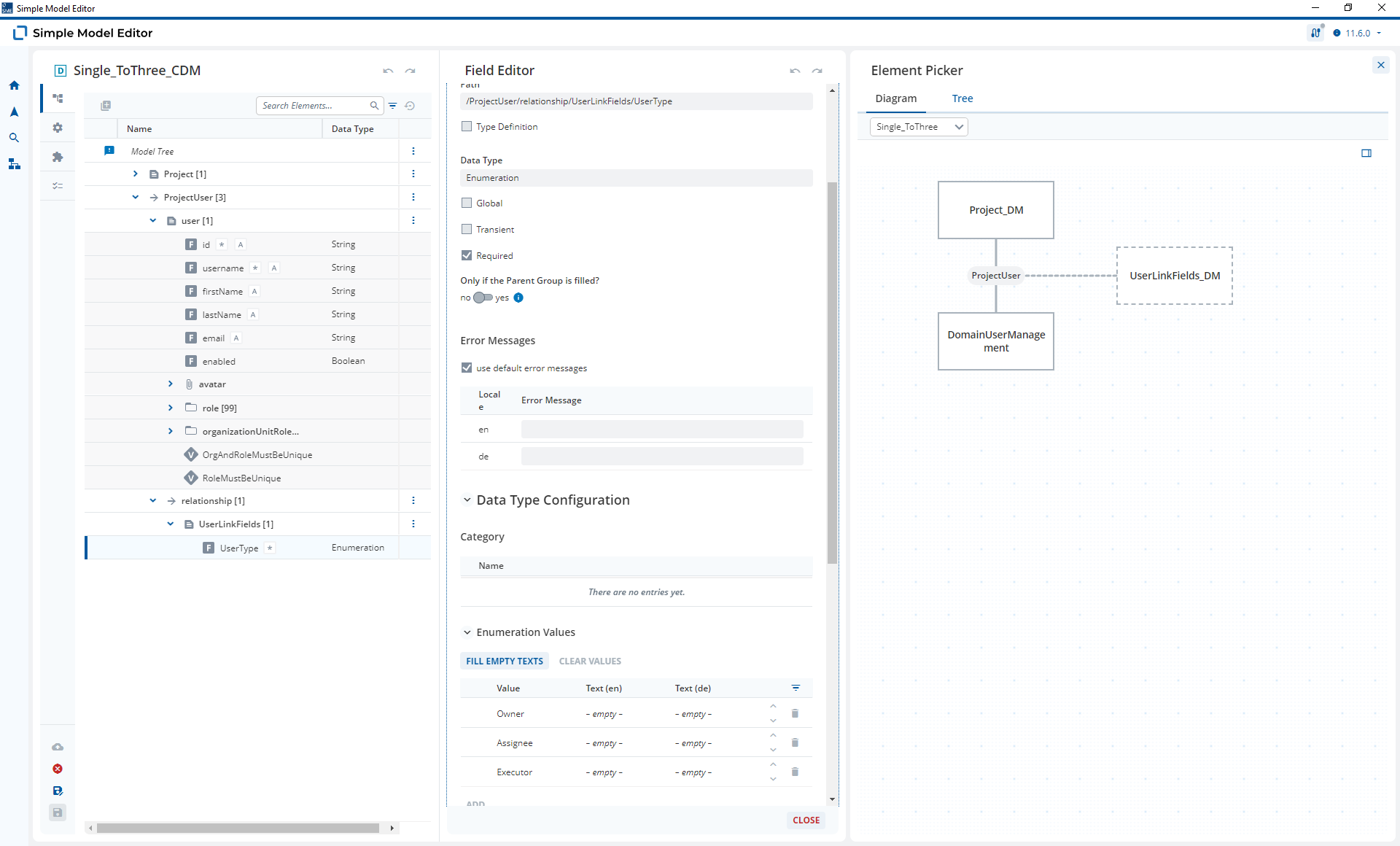
Alternatively, you could change your Model Graph to use an n-to-3 relationship with Link Fields.

As this uses a to-many relationship, the required Fields will only be triggered when a Relationship Link has been created (like required Fields in a Repeatable Group). As you can see in the screenshot, you can also use Link Fields to specify which type of User is being linked: An Owner; an assignee; or an executor.

Regarding point 2, please create a UAA topic.

You can link to this topic by clicking reply and then select “Reply as linked topic”

Hi @malcolm-silver-ice,

Please excuse my late reply. I am only working on this project part-time.

The Model Graph you posted is correct.

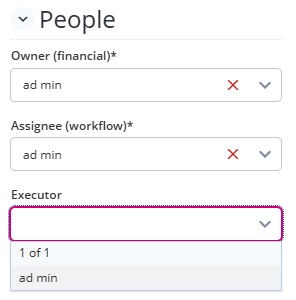
Unfortunately, I can’t use an n-to-3 relationship because, as you can see in the “People” section in a previous screenshots above, I want to have separate select boxes for each user type, rather than simply adding users and assigning them some type.

I’ve checked the documentation a little bit, but I don’t understand when and how to use FieldFilled(t_docRef).

However, the following worked for me:

  • In DomainUserManagement, I set username as Required, but only if the Parent Group is filled.
  • In Customer_DM, I did not set the Required flag for Id and Name, but I added simple validation rules: FieldNotFilled(Id) and FieldNotFilled(Name).

Here’s the current behavior:

  1. When logging in as usermanager, the Preview App automatically displays a navigation item called Users Management. From there, I can create new users. The username field is checked for emptiness. :white_check_mark:
  2. When I create or edit a customer in the Customer Form, both the Id and Name fields are checked for emptiness. :white_check_mark:
  3. When I create or edit a project in the CFM with relationships to a customer and the three user types, the validation rules I set up in the CDM are enforced. These are:
    3.1 Customer must not be empty :white_check_mark:
    3.2 Owner must not be empty :white_check_mark:
    3.3 Assignee must not be empty :white_check_mark:
    This means the Executor drop down can be left empty. :white_check_mark:

I honestly don’t understand why DomainUserManagement and Customer_DM behave differently, but I assume it has something to do with the UAA client.

From a UX perspective, it’s not ideal that the error messages for empty customer or users (Owner, Assignee) appear at the top rather than next to the relevant dropdown fields. Additionally, the message “This issue cannot be fixed in the current form.” is very confusing. I highly doubt this won’t be criticized during the usability test. :cross_mark:

The t_docRef Field is a technical Field that you add to the CDM. When you select a Document in the Binding, the docRef of the linked Document is added into this field in the Frontend

In you example:

This would mean that:

  1. A t_docRef Field in the Group representing the ProjectOwner Relationship would be filled
  2. A t_docRef Field in the Group representing the ProjectAssignee Relationship would also be filled with the same docRef
  3. A t_docRef Field in the Group representing the ProjectExecutor Relationship would be empty.

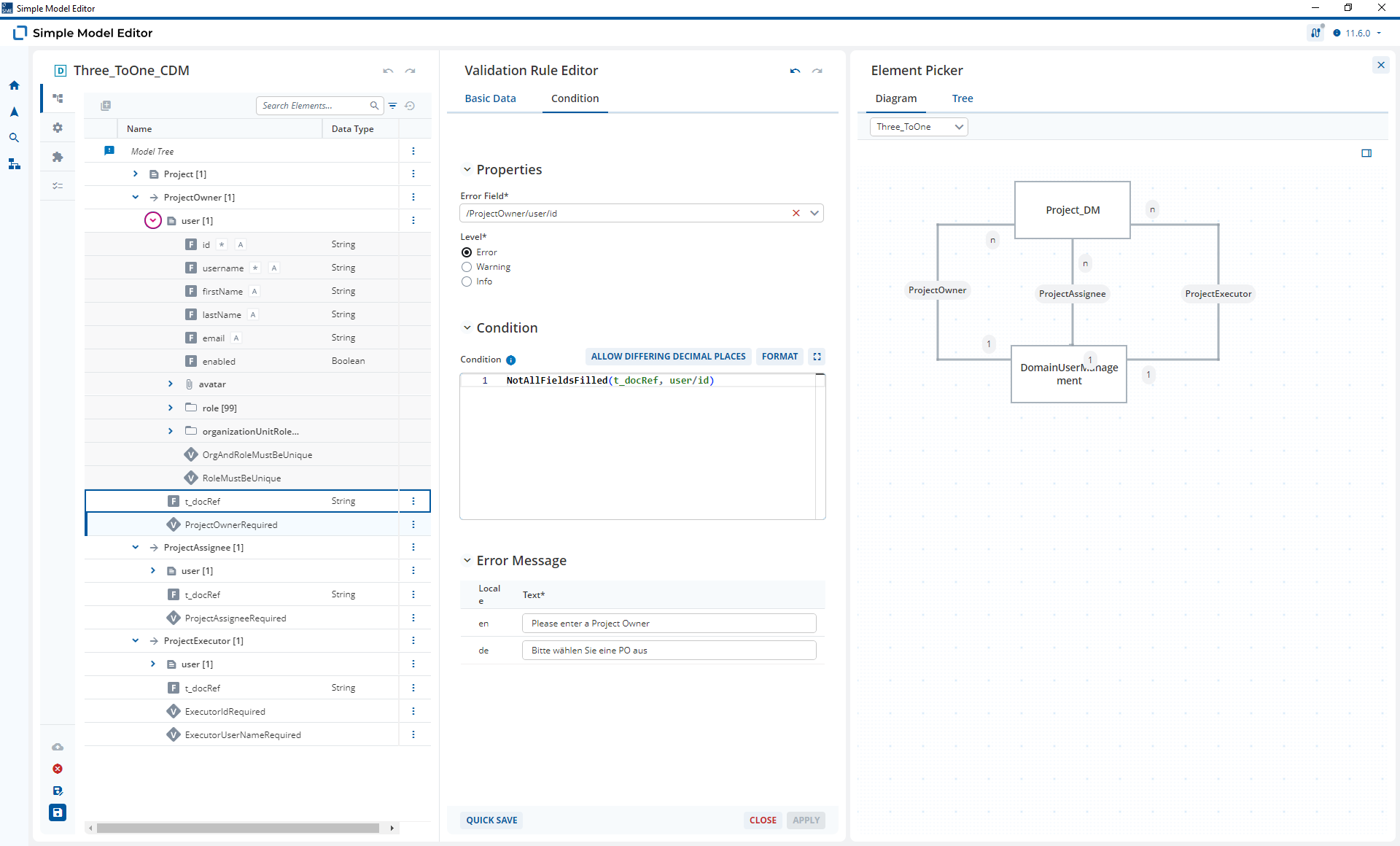
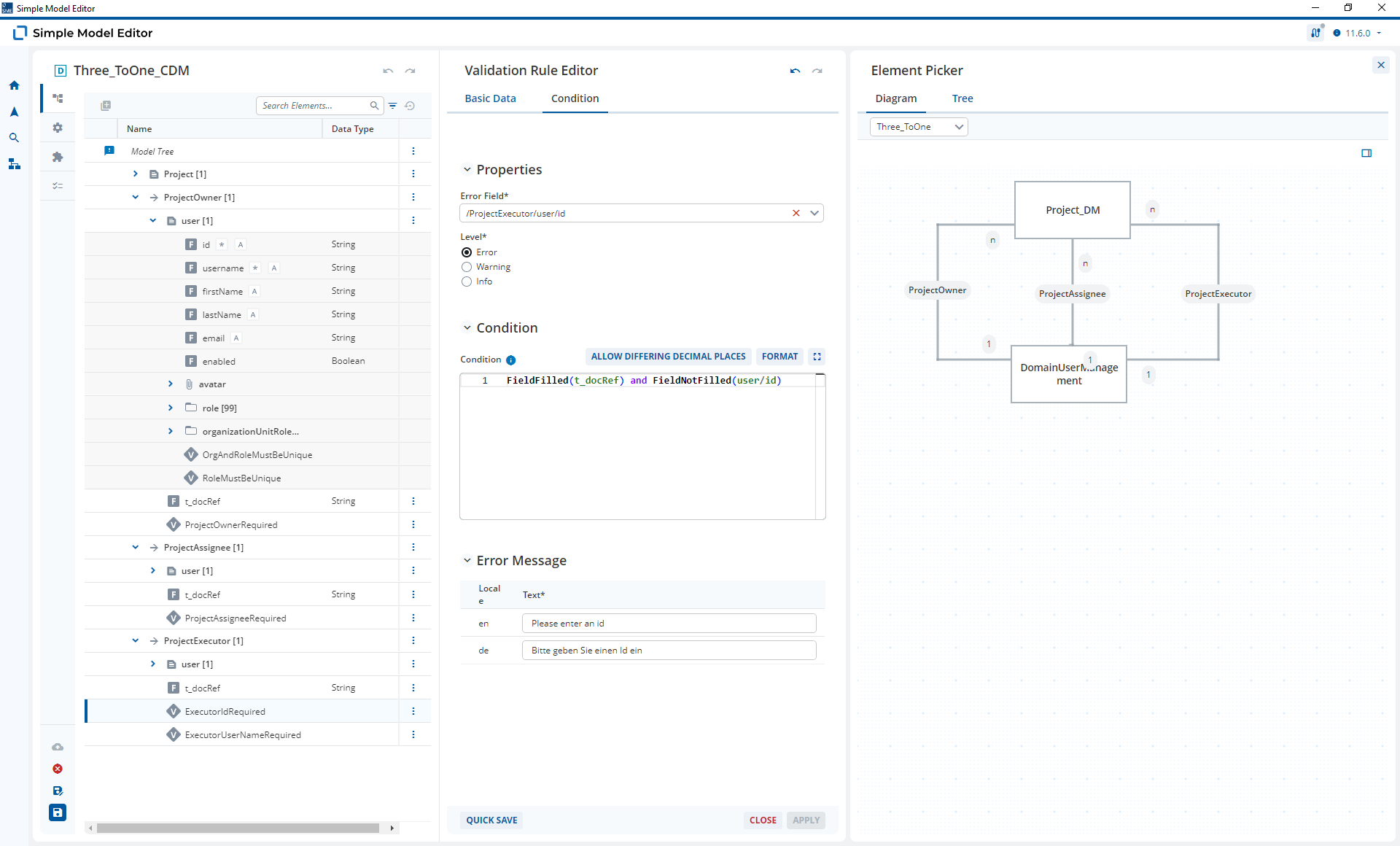
You can use this t_docRef Field and it’s status (Filled / Not Filled) to model validation rules. Based on your use-case:

The t_docRef for the Customer and Owner Relationships must be filled. This looks something like this.

For the Executor, the rule looks like this as the id is only required when a Relationship Link is present:

This is where things get tricky. The id and username fields that are required of on a different document. In your CDM context, you can add new documents or edit them and you do this on a different Form. As the required Field that you need to fill is on a different Form you see:

So you need to change this message there is a workaround that involves moving the error field, for example the id on to the current screen of the Form and then hiding it. It looks a bit like this

A12-13297 is still waiting to be planned but progress has been made with Message Display elements in the Content Model (A12-16272) which gives me hope that we could get these elements in the Form to display error messages with bindings.

According to the documentation, the t_docRef is used to determine, whether a link is established. So it can be used to hide fields (as explained in the documentation) or to ensure that certain fields are filled when a relationship is established etc.

In my case, customers and users are each created and validated in their own forms. When I establish a relationship from a project to an existing customer or user, I can be confident that their documents are valid — meaning fields like Id, Username or Name etc. are filled.

I assume that validating with GroupNotFilled(Customer) and GroupNotFilled(user) without checking t_docRef is sufficient for my use case. That seems more transparent to me and separates responsibilities. This approach is now working well in the setup I described earlier.

If anything is unclear or you think I might be misunderstanding something, we can gladly have a call together tomorrow.

Thanks again for your answers :slightly_smiling_face:

Okay, I haven’t tried the workaround with the hidden field, but I understand it and will use it if needed. Otherwise, let’s wait until the feature is implemented.

Yes, if you do not plan to add or edit the documents and simply validating if a link is present, then this approach should work. One of the reasons it works is that Validation Rules on a CDM are only evaluated in the frontend, when looking at the Form with the Bindings on it. The Validation Rules won’t be evaluated in the backend.

Part of the charm of using the t_docRef Fields is that these are a frontend only feature, too. This means you are more explicitly modeling “frontend-only” Validation Rules.

Thanks to the exchange with @malcolm-silver-ice, I understand it better now :slightly_smiling_face:

The Discourse thread can be marked as “solved”.