An ArticleGroup with a name, which can be assigned to both, an Article (Product) and a Document.
Every article/document can have multiple article groups assigned.
Now, our use case is that a user wants to search for an article (e.g. by article number) and get all related documents for it, which can be found through the ArticleGroup model/relations.
I suppose that this would somehow have to happen inside a special “overview” which combines all 3 of the models together and could be imagined like an “SQL join”, which could look like this:
select * from article, articlegroup, document where article.articleNr="X" and article.articleGroup="XYZ" and articleGroup.name="XYZ" and document.articleGroup="XYZ"
My question is, is this somehow possible using A12?
I came accross Simple Composed Data, which could maybe help us here. But I am not sure if it allows for such complexity…
I model with A12 so let me quickly tell you what you can model in A12.
Simple Composed Data Models (CDMs) allow you to work with the information from your three document and two relationship models. A Simple Composed Data Model can then be used in a special overview, which shows data from the fields on you CDM.
I see a couple of difficult points here:
You can only show fields in the overview, not lists. This means that you would not be able to show the list of linked documents in the overview. Expressions in the overview are being developed but have not yet been implemented.
You can only show a list on the form model. You can easily show the ArticleGroups that are linked to the Article, just link a normal table list binding view but not the “list of lists” that shows the documents. The advantage of the CDM is that you could then click on the ArticleGroup to see the ArticleGroup form and the list Documents which are linked to that particular ArticleGroup.
All in all this means that you can create a CDM for the Article. You can sort and search for article numbers in the CDM overview and select an Article with the correct Article number. Then, on the CDM you can click through the linked documents and see the lists of linked products for each ArticleGroup that is linked to this Article.
For us it would be enough if we could have an overview with the following columns:
Article Nr | ArticleGroup name | Document ID | (eventually more fields from “Document” model)
As I understand, then a user could filter e.g. by Article Nr and get from there to related ArticleGroups and from there to Documents!? That would already be enough for us, as long as it is within one “click flow”, and not switching between different overviews and manually searching for IDs or names…
To avoid showing a list, we could for simplicity at the beginning assume that every article has exactly one ArticleGroup assigned, and every Document belongs also to exactly one ArticleGroup. Like that, we could then show it in the CDM overview?
In general, we are lacking a detailed explanation or example of a CDM. Can you provide us with any example workspace or additional documentation?
Assuming this is true, you can show this information in an Overview Model which references a CDM.
The problem with point 1. is that in your use-case, you say:
This means that you have a list of ArticleGroups. We cannot currently show this in the overview as the overview model only allows us to reference a field with repeatibility = 1.
If you let me know which version of A12 you are using, I can try to prepare a CDM example workspace for you.
No problem @anon61393032. I can’t upload the files to A12 Discourse as we have a restriction in place but I’ll send you the workspace to your email address.
The workspace is based on the use-case shown in the CDM documentation.
I did some more testing this morning and you can create a of Documents on the ArticleGroup repeat in the Article CDM by using an expression.
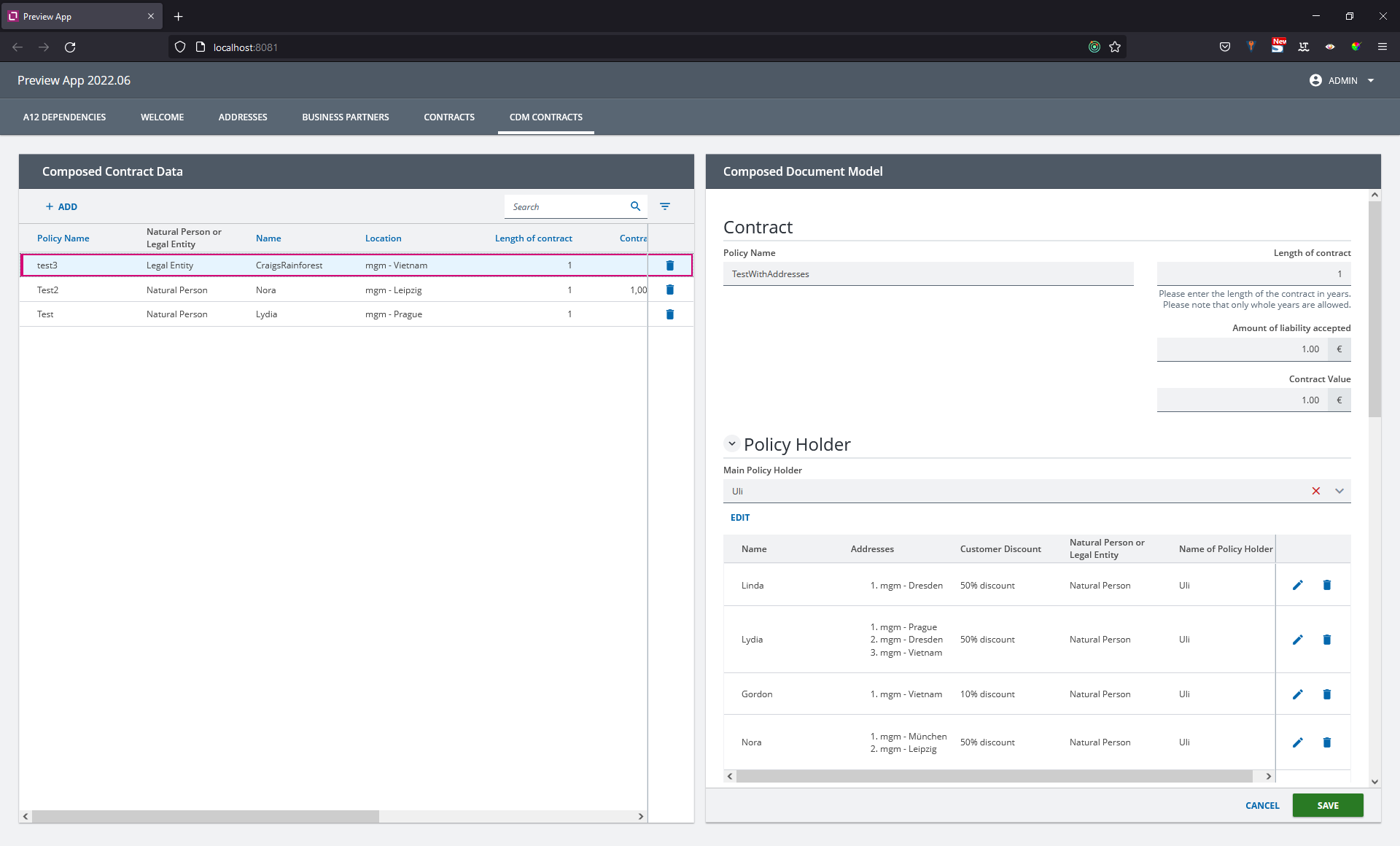
I’ve attached a picture from the CDM Example workspace based on the documentation which shows the Addresses of co-insured Business Partners on the repeat. This has the same data structure as your example.
thank you very much for your help. We now already got more familiar with the topic.
Still, we got a doubt about our concrete use case:
When I compare our use case with the one from your example, ours differs from it in that one relationship goes in the opposite direction.
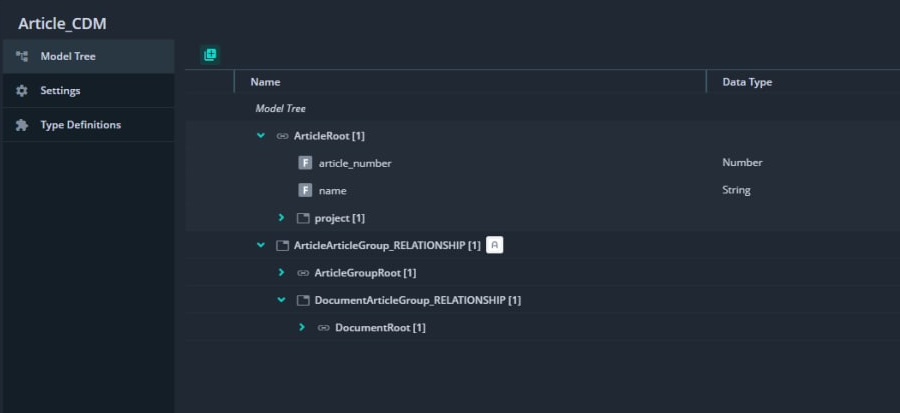
In your example you go from Contract to BusinessPartner, and from BusinessPartner to Adress. In our case it goes from Article to ArticleGroup, and from Document to ArticleGroup (one Document has one/many ArticleGroups). But we still want to combine all 3 models into one CDM.
Here you can see our model graph:
So our doubt is, whether we can still combine it all into one CDM? The goal would be to search for an Article in the overview, then see its ArticleGroups, along with the Documents (which can be inferred from Document → ArticleGroup relationship).
I suppose that our structure is not completely correct like this. But I don’t know how to change it, to make it work with our use case.
The only thing that comes to my mind would be to “invert” the relationship between Document → ArticleGroup, to be ArticleGroup → Document, but this would not represent our use case anymore.
If you want to be able to search for the field in the overview, then it needs to be a single field. This means that the field:
May not have repeatibility > 1
May not be in a relationship with multiplicity > 1
As the relationships you show in the picture have multiplicity = 1, there is nothing to stop you from changing the structure so that you start with ArticleGroup and then Include Article and Document as Siblings.
The Article Number field will still be a single field so that you can search for it. The order of the relationships simple defines which document you create first. If your picture, you create an article when you clikc on add in the CDM overview. In the proposed solution, you would create a new article group when you click on add in the overview.
Thank you, this is the solution to the problem! Now we can see content of all 3 models in one CDM.
Let’s now assume we DO have repeatability > 1 or multiplicity > 1 in a field/relationship. In that case we cannot display the information directly in the overview, but still in the form model (e.g. as table, etc), am I right?
Quick follow up question:
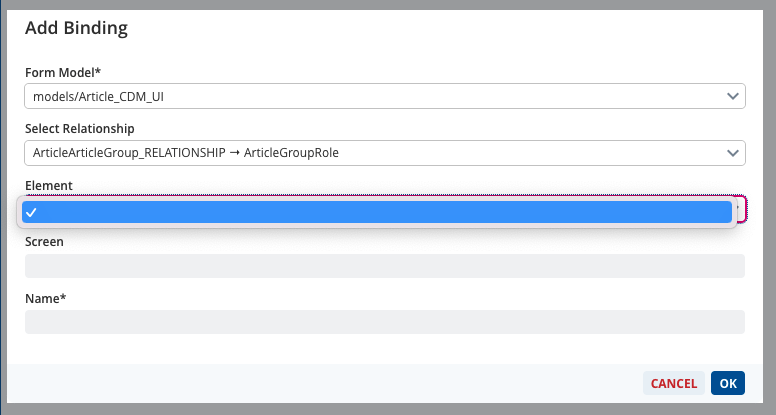
When trying to create the binding for a relationship field inside the CDM form, for us it is not showing “Element: section” automatically, in the dialog. The element dropdown is just empty.
When creating the binding for a role with multiplicity > 1 (e.g. ArticleGroupRole) you first need to drag and drop the repeatable group into the form model and save the form model. Please make sure that the repeat type is set to “detached” to create a detached repeat.
After saving the form model, switch back to the SME, refresh your workspace, and you will be able to select the detached repeat as the element.