I have a Relationship Model (1-Many), where one side is a Normal Document (SowContract-DM), and the other side is a Workflow Document with the a12wf metadata (SowContractProcess-DM). I want to include the list of SowContractProcess-DM in the SowContract-FORM as a table.
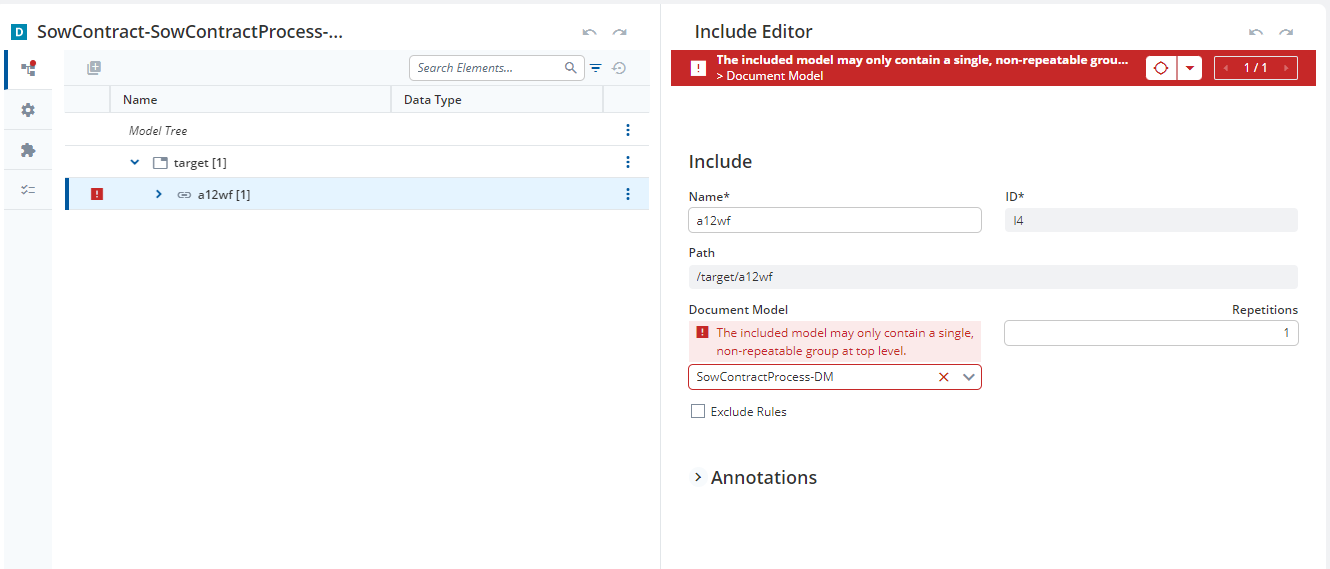
I generated the Document by clicking the “GENERATE DOCUMENT MODELS” button in the “SowContract-SowContractProcess-RM.” However, one of the generated documents has an error: “The included model may only contain a single, non-repeatable group at the top level,” as shown in the image.
What does this error exactly mean?
How can I resolve this issue?
Is it feasible to add the list of documents with the a12wf metadata to the Form Model as a table?
Hey @n.garryyev, thank you for your question. If I understand it correctly, the issue here is that you have 2 root groups in your document that should be used in the Relationship Editor. In the current situation this is not possible, but the Workflows Dev Team is currently working on a solution for this problem! However, I have forwarded your request to our Workflows Dev Team. You will receive another detailed response soon! Unfortunately, they are currently very busy, so there may be a delay in processing. I apologize for this, but hope that we will be able to provide you with an answer in a timely manner. Your Discourse Team
Hi @n.garryyev , as @jan-clear-pine mentioned this is currently a limitation when using Workflows. We are working on resolving this by allowing you to have the a12wf metadata group included anywhere in your document model, which would allow for you to have a single root group and resolving your issue. This feature should be ready for our next release which is scheduled for later this month.
Do we have the feature that allows the inclusion of the “a12wf metadata group” anywhere in the document model in the latest release?
Hi, this feature was a bit more complex than anticipated and has so far only made it into the 2023.02 release line. If you are using the latest version of that release line that feature is included. Otherwise, I would expect the feature to be included in the next 2023.06 release which will come later this month/early next month.