Heyho,
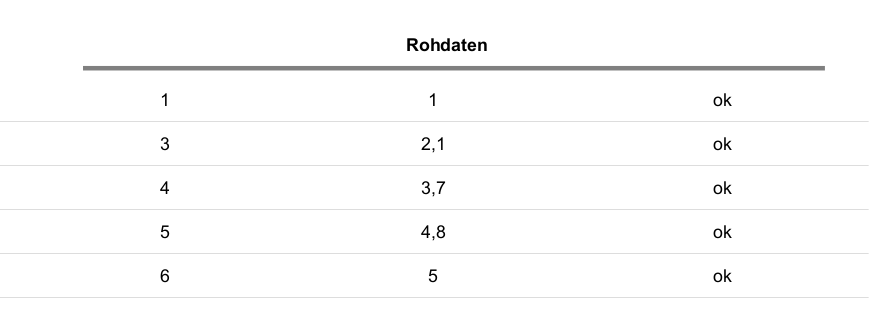
i’m not aware how i can model a table or listing (what is the difference ?) in the Print Model Editor. In my case the element has to look like this:
The first column contains the index and the second the value. The third can be ignored.
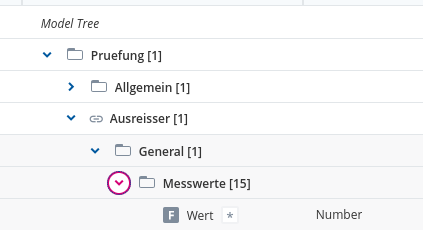
My DM looks pretty normal 
Does anyone have an idea which element has to be used and what i have to do to get the current repetition and the value ?
Happy regards,
Tjorben
Hello @tjorben-atomic-moss,
The Solution you are looking for is the Listing Element within The Print Model Editor.
- Add the Element Listing
- Add two Columns under Columns, one for the Index one for the real value
- Edit the Index Column
- Include a Default Computation with the Value Computation
- Include following Operation for the Value Computation: [CurrentRepetitionOfParent]
- Include a Group Computation with the Property Computation: Property “Hide cell”, Operation “True”
- Edit the Value Column
- Include a Default Computation with the Value Computation
- Include following Operation for the Value Computation: [value]
- Include a Group Computation with the Property Computation: Property “Hide cell”, Operation “True”
I also included some Models so you can look them up
Listing_DM.json (2.5 KB)
Listing_FM.json (2.6 KB)
Listing_PM.json (6.2 KB)
Listing_DM-1743594148989.json (243 Bytes)
If you have further questions, feel free to contact us.