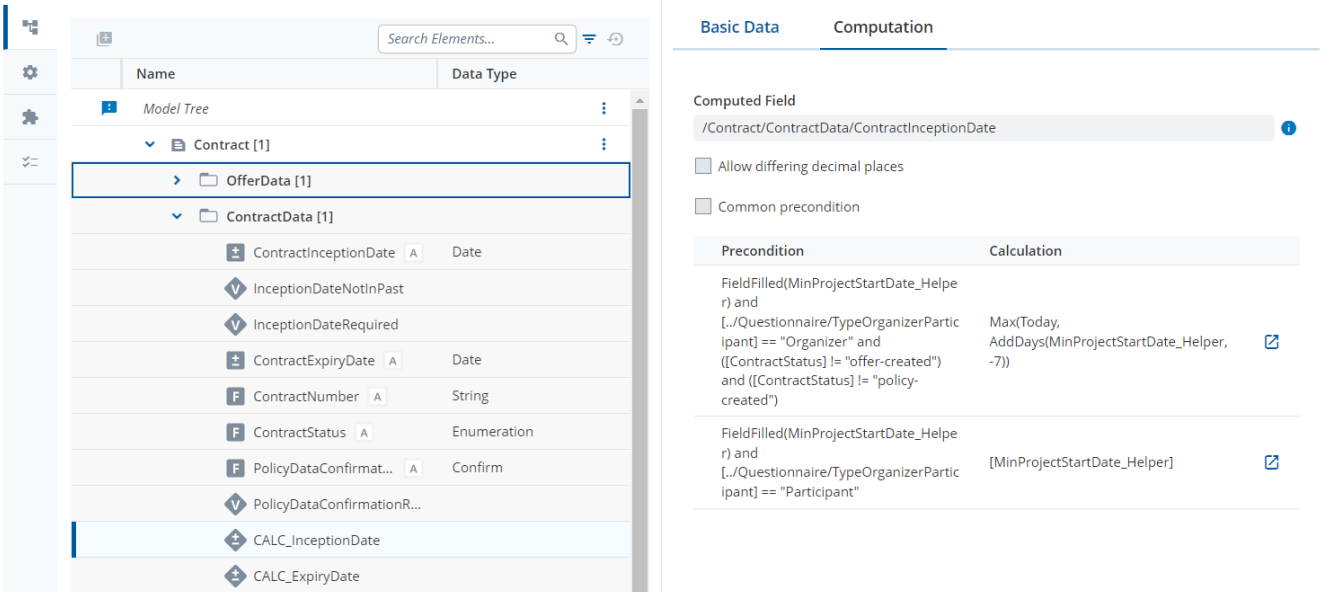
We’ve observed a significant change in computed field behavior in version 2024.06 compared to the previous A12 release. In the earlier version, if no precondition matched during a document update, the previously computed value remained unchanged. However, in the 2024.06 version, these fields are now being cleared in the same scenario.
This change introduces some challenges for us:
Reliance on Previous Behavior:
We have workflows that depend on retaining the previously computed value—particularly in situations where we intentionally prevent recalculation based on document status. This was a helpful feature in controlling field updates conditionally.
Readonly/Non-editable Mode Concerns:
In certain document stages (e.g., when the document is set to read-only on the front end), we expect the backend to respect that state and avoid recomputing or clearing values. Is there a way to stop the calculation in such non-editable states? It would be helpful to know if this is achievable via model configuration or another mechanism.
Migration Strategy:
We’re also concerned about how to manage migration. Specifically:
How and when should we ensure that the initially calculated value is copied to a separate field?
What’s the recommended approach to retain those historical values during the migration process?
We have a use case where we need to compute the Contract Inception Date based on Today() but only when the Contract Status has not yet reached "Offer-Created".
Once the document reaches "Offer-Created", it enters a read-only state on the frontend, and we expect the Contract Inception Date to remain unchanged — effectively frozen at its last computed value.
With the 2024.06 behavior, however, the computed field gets cleared when no precondition matches, which results in the date being lost.
How can we prevent the computed value from being cleared once the condition no longer matches?
Is there a recommended model-based way to:
Stop calculation when the document is in a non-editable (read-only) state?
Persist the previously computed value if recalculation is not intended?
Alternatively, if such behavior isn’t supported directly, what’s the best practice for preserving this value — possibly involving migration or using a helper field?
A lot of your question relates to how computation rules are evaluated in the backend. The change in behavior that you have seen probably comes from one of two things.
Kernel deprecated IDocumentComputationResult#apply(Consumer) and IDocumentComputationResult#apply(IDocumentFactory, Consumer). You are now recommened to use IDocumentComputationResult#applyTo(IDocument) and IDocumentComputationResult#applyTo(IDocument, IDocumentFactory) instead. There is a difference in these methods though as “applyTo” clear the field instances that are unfilled after the computation. See here.
Data Services added a setting in 2024.06-ext2, mgmtp.a12.dataservices.documents.computation.cleanup-error-and-not-computed-value.enabled, to allow you to recompute fields to null. Check out Empty String when no calculation applies for a discussion of that optional setting.
If your issues relate to either of these settings, please create a new thread in the Kernel or Data Services category.
That being said, there are some modeling recommendations.
Be Explicit in your Preconditions
If you need to compute in certain status then Language Constructs like
FieldValueIncludedInValueList(Field, ValueList), see here
AtLeastOneFieldValueIncludedInValueList(FieldList IN ValueList), see here
are really helpful as they allow you to enter a ValueList of your status values. These Language Constructs work with String, Number or Enumeration Fields.
Computations are always up-to-date
There is no modeling setting for preventing a re-computation. This is normally a great feature as you can be sure that the computed value is correct. However, it does mean that you cannot easily freeze a value.
Your use-case was already raised in A12-11467. If you want to support this ticket, please let me / your A12 project contact know.
Modeling and Migration Options
Can you write the date into the contract using your workflow process?
You mention that,
If this means that you are using the Camunda Engine, can you simply fill the Date Field as part of your BPMN process? This would mean adding a Service Task into the process. This would accurately reflect the business logic that you are setting the value once, at a specific stage of the process.
Workarounds
You can “freeze” a value in the frontend by modeling a Field Dependency that sets the value of your computed Field in another, non-computed Field. You should however remember:
This will only work in the frontend in the Form Model where it is modeled
This leads to an inconsistency between the frontend and backend behavior of your models (but this seems to be desired)
Thank you for the detailed information and suggestions.
I’ll need a bit of time to digest the related backend settings before potentially following up with another post.
In the meantime, I’m exploring the option of extending my Camunda process to store the computed value into a separate field to act as the final, persistent value. However, I have a concern that might affect the migration implementation:
When exactly is the computation triggered?
Is it during document opening, application indexing, or while running a migration job…?
My worry is that the computed field might be re-calculated and cleared before I have a chance to copy the value during migration. Could you pls advise who would be the best contact team to clarify?
The computation is triggered in a number of different ways.
I don’t think that application indexing causes an issue for normal Documents. It might affect Composed documents due to the CDD index in 2024.06. It might be worth asking Data Services directly in a different thread.
I imagine that running a migration job would lead to recomputation as you are editing and saving the documents. There might be Data Services settings relating to this.
As far as I am aware, per-default the computations will be triggered.