I have a print model with an area element that is linked to the repeatable group “address”. In the area, some fields of this repeatable group are displayed. Addresses can be marked as private or business (enumeration) and as current address (Boolean). A hide condition on the area ensures that only entries with the values “private” and “current address=true” are displayed.
The printmodel displays the correct entry, but:
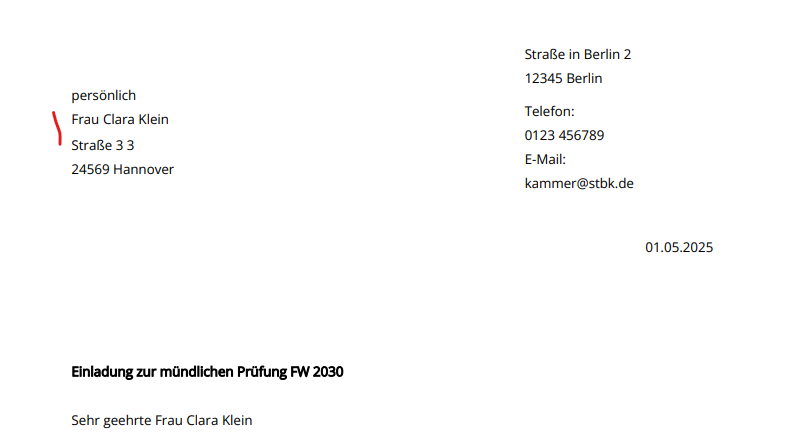
- If the matching entry in the repeatable group is the first entry, it looks fine. The address is displayed as it should and the next element follows with the right distance.
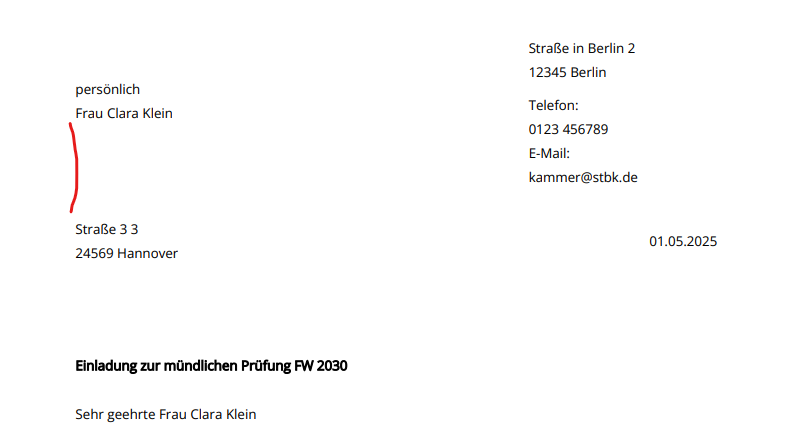
- If the matching entry is the second or third in the group, the correct data are shown in the PDF but free space is added above the address (would be used by the other two entries if not hidden).
address is first entry:
address is third entry:
Can I fix this by modelling or is it a bug?
Hi Linda,
we analyzed this in Print Engine team and came to the conclusion that what you describe cannot be solved by modelling, sadly.
The reason is that the area element in the Print Model will always “reserve” the space, which is why on the print output there is a whitespace, which - I’m sorry to say - is a feature, not a bug.
You could, however, file a requirement to A12 Print Engine team that is along the line of “Feature request: Hide condition for repeatable instance of a repeatable area”.
If such a hide condition was true, it would hide this and there was not whitespace caused by the area element. This would also work well with FieldNotFilled or GroupNotCollectivelyFilled, for example. Print Engine team could make an estimation about how much effort it would take to implement such a feature, and then your customer might decide whether they want to order.
If you have any follow-up questions, let me know.
Hi Christoph
thank you for the reply. I created A12-17513 for this request.