We are supposed to include a “back” button in the header of our form engine.
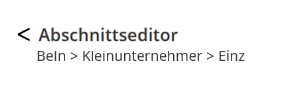
Is there currently an official way to do this or do we need to create a new requirement?
We are supposed to include a “back” button in the header of our form engine.
Is there currently an official way to do this or do we need to create a new requirement?
As a modeler, you can add buttons to the subheader of a Form Model.
Just to check… I see the breadcrumb under your proposed back button. Are you on a normal screen or is this a detached repeat screen?
This is a normal screen, the breadcrumb will be added, but that it’s a problem as I see it.
I saw that you can add buttons to the subheader, but we got this design proposal from UI/UX
It’s possible to add buttons on the header of the Form Engine screen via widgetMaps ActionContentbox prop.
You can add a custom contentbox with a prop for headingButtons or headingElements.
You can also try to use the approach mentioned on the widgets page: Content Box - Showcase
Thanks, we’ll go the widgetMaps route, as we already have a custom widget map, so adding one additional component isn’t much work and I’m not sure what you mean with the approach mentions on the widgets page 
If you are talking about the “Navigation context aware ContentBox”, that would be an interesting approach, but for our specific use case, I would estimate it to be more work.