Hi @stephen-warm-graph,
The operator, GroupFilled(Group), may be used for repeatable groups. Here are some valid combinations based on this workspace:
- Example 1
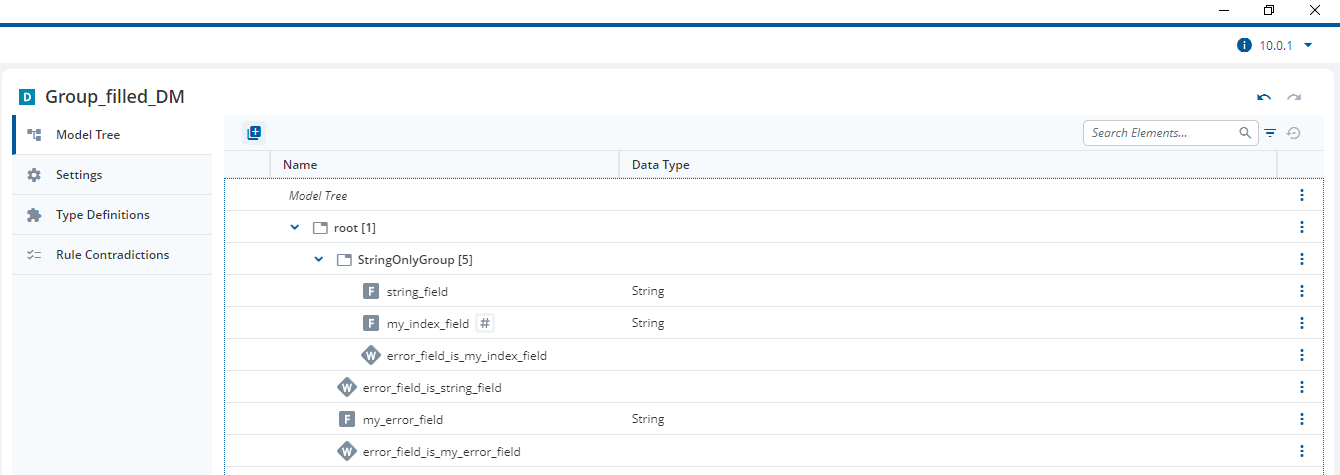
Rule: error_field_is_my_index_field
Error Field: /root/StringOnlyGroup/my_index_field
Error Condition: GroupFilled(RuleGroup)
This is modeled inside the repeatable group. The error field is also inside the repeatable group. There can be up to 5 error messages (one for each instance of the repeatable group, StringOnlyGroup[5]) and there can be 5 error fields. This means that the repeatability of the error messages and error fields match correctly.
- Example 2
Rule: error_field_is_string_field
Error Field: /root/StringOnlyGroup/string_field
Error Condition: GroupFilled(StringOnlyGroup)
This is modeled outside the repeatable group. Once again, the error field is inside the same repeatable group so that the repeatability of the error messages and error fields match correctly.
- Example 3
Rule: error_field_is_my_error_field
Error Field: /root/my_error_field
Error Condition: FieldFilled(my_error_field) and GroupFilled(StringOnlyGroup For "my index")
This is modeled outside the repeatable group. The error field is also outside the repeatable group, so we need a way to reduce the number of possible error messages to 1.
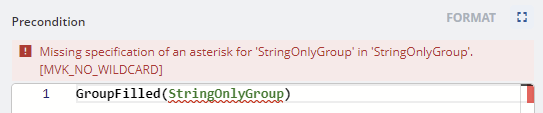
Your idea of using the Asterisk operator to consider the list of groups was good, but the documentation describes the rule as, GroupFilled(Group). This means that we can only reference a single group and not a list of groups. StringOnlyGroup* returns a list of groups so may not be used, as seen in your first screenshot.
You can reduce the number of possible error messages to 1 by specifying an index. In this example, I created the field, my_index_field and set that as the index field for StringOnlyGroup. I can now specify an index using the Semantic Index. This means that I only have one error message possible, the error message for the instance of the repeatable group with the index, “my index”.
Please note, you cannot use the filter operator, Having, with groups, so the Semantic Index is the only way to go.
I could reproduce your second error by modeling the rule outside the repeatable group with an error field that was also outside the repeatable group. As I showed in example 3, please consider using a Semantic Index. Alternatively, you could move the rule or change the error field, as I did in examples 1 and 2.