Hello everybody!
In our project, we are having trouble displaying repeatable groups in PDF files generated using the printModel.
Specifically, I have a question about the print engine and a document we want to generate as part of a process.
In this process, there is a table where an event period (the “from” and “to” date fields) is entered.
I am facing the following challenge: A document (1 document = 1 page) must be generated for EVERY event (depending on the number of rows in a table).
This now presents the following challenges:
- How do I extract only the first value from a date field (or generally from another field in a column) of a table into the first document?
- How do I include only the second value from a column in the second notification, the third value in the third notification, and so on?
- How do I create more than one document without generating a blank page, since these are dynamic?
I would appreciate it if anyone has an idea about this or has perhaps already solved the problem.
Does anyone have an idea how to achieve this? We are currently on Release Line 2025.05-ext2.
Best regards! 
Hey @sascha-red-ridge ,
thanks for your interesting question - and sorry for the short answering delay. I was checking back with the involved teams and would recommend you one of the following options:
-
Model the internal structure (1 event) as a separate Document Model (EventDetail_DM) and include this with Repeatability>1 into the Document Model you are using right now (lets say “EventsPlanning_DM“. Then model the Print Model on the smaller EventDetail_DM.
With custom code: read the documents of EventsPlanning_DM with Kernel’s DocumentV2. With DocumentV2” it is easy to extract the repetitions. You can then hand over the data of each repetition to the Print Engine and get exactly one pdf per event (This works because the repetetions match exactly EventDetail_DM)
Bonus: This works even if there is overflow and more than 1 page per event.
-
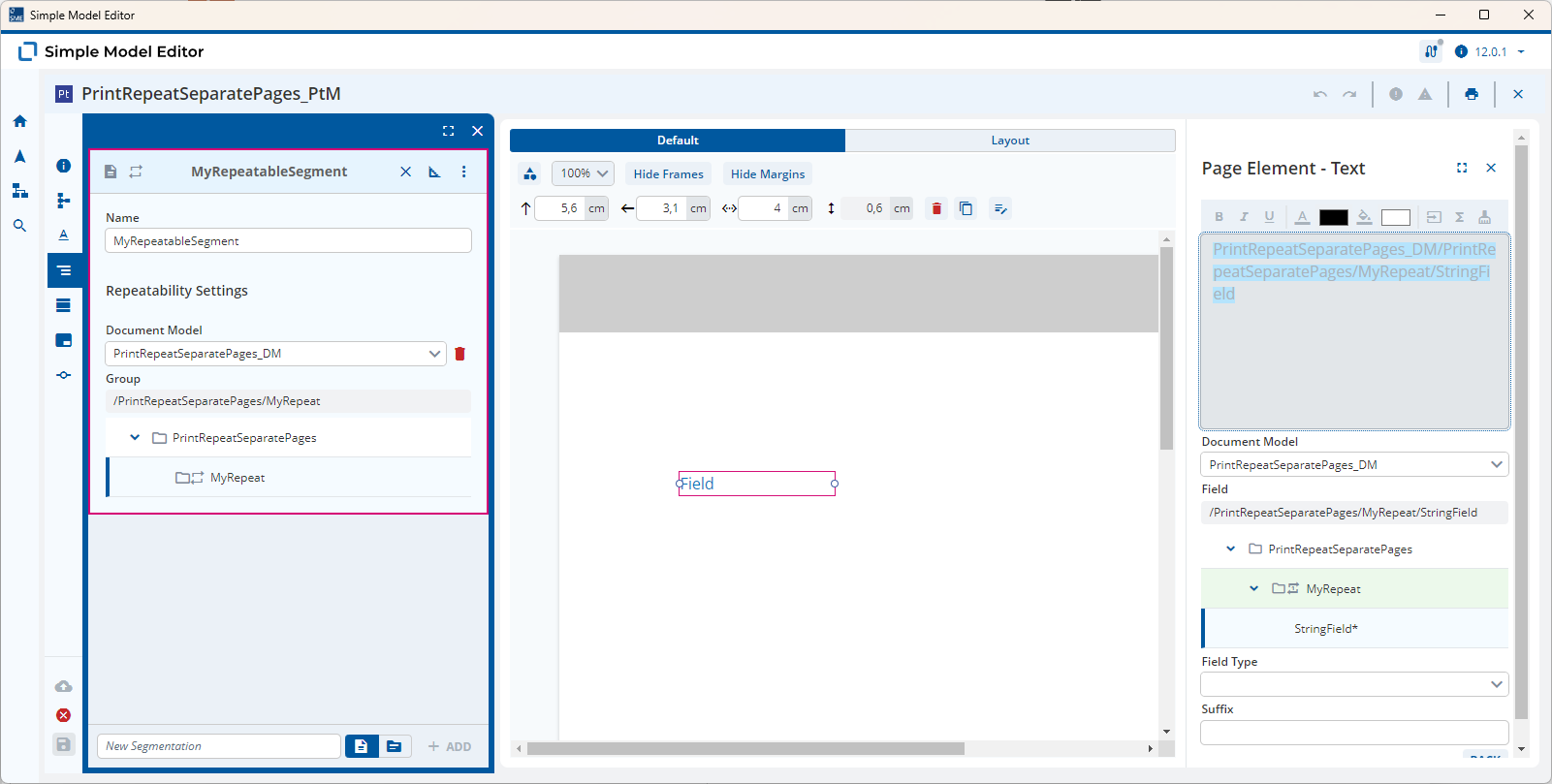
Model the Print Model on EventsPlanning_DM. You can reflect the Repeatability by linking the Segment to the Repeatable Group: GetA12 (Each Repetition will result in 1 Page, within the Segment you can model as usual.)
If each event detail really is just one page, then you can configure Print Engine to output a page range into the pdf.
With custom code: extract how many events are in the full document, print the full document n times setting the PageRangeRestriction to the appropriate number.
-
Print the full document (model Print Model as above with Segments)
With custom code: use pdfBox (is already a dependency of Print Engine) and split the full pdf into individual pages (this should be the most performant with the current setup.)
-
File an A12-requirement to set a flag to output one pdf per segment (this will be a rather low effort and would allow a solution without custom code, but earliest available in October)
Thanks @felix-blazing-river
@sascha-red-ridge, here are some example models showing how the Repeatable Group is linked to the Segment.
PrintRepeatSeparatePages_DM.json (1.8 KB)
PrintRepeatSeparatePages_PtM.json (4.8 KB)
In this case the Values for StringField are printed on separate pages as described by @felix-blazing-river in the 2nd and 3rd options.
Hello @malcolm-silver-ice & @felix-blazing-river
Thank you very much for your responses and assistance. I’ll take a look at your suggestion(s) and get back to you if I have any further questions.
Best regards
Sascha