Hello,
If I’m correct, my requirement to conveniently display warnings in embedded repeats during partial validation cannot currently be modeled. This is especially true if the line has been closed again.
For me, two variants come into consideration, ideally both can be fulfilled. Unfortunately, these options are not yet available in the SME.
- Use of the validation bar not only for full validation but also for partial validation
- Warning symbol at the beginning of the affected table row, as with errors
I would be interested to know if I’m wrong and there is a possibility here, or if someone has already had a similar problem with a workaround.
Hi @bjoern-sharp-oak
Whilst your observations that:
- The Validation Bar is not shown for Partial Validation
- The Warning Symbol is not shown at the start of closed Embedded Repeat Rows
are correct, I would like to ask a different question, when should the user see this warning?
If the answer to this question is that the user should see this warning whilst entering data into the Embedded Repeat, then I have a workaround for you. The background to this is that Partial Validation is triggered for the Repeat when you:
- Change a Value in the Repeat
- Focus out of the Row
- Focus out of the Repeat
It seems that your warning relates to multiple data points so that the Partial Validation that happens when you change a single value does not have all the Relevant Fields. As a result, the Partial Validation of your warning is only triggered when focusing out of the row or the repeat. This means that if the user focuses out of the row by closing the row, the warning is not seen.
So, let’s look at how you can change this.
Warning Displayed Whilst Entering Data
As I mentioned, a Partial Validation can be triggered by a change to a Field Value. This means that if you can model a single field that reflects your Warning, you can just check the value of this in your Warning and the Warning will fire as soon as this value changes.
This means you need to:
- Model a Computed Field in the Repeat, for example a Confirm
- Model a Computation Rule that sets the Confirm to
True when the Warning should fire
- Adapt your Warning Rule so that it checks if the new field is
True
- (Set the Field to Transient if you don’t want to save this value in the database)
- (Set the Field to Global if you want the Rule to fire without addig this field to the UI)
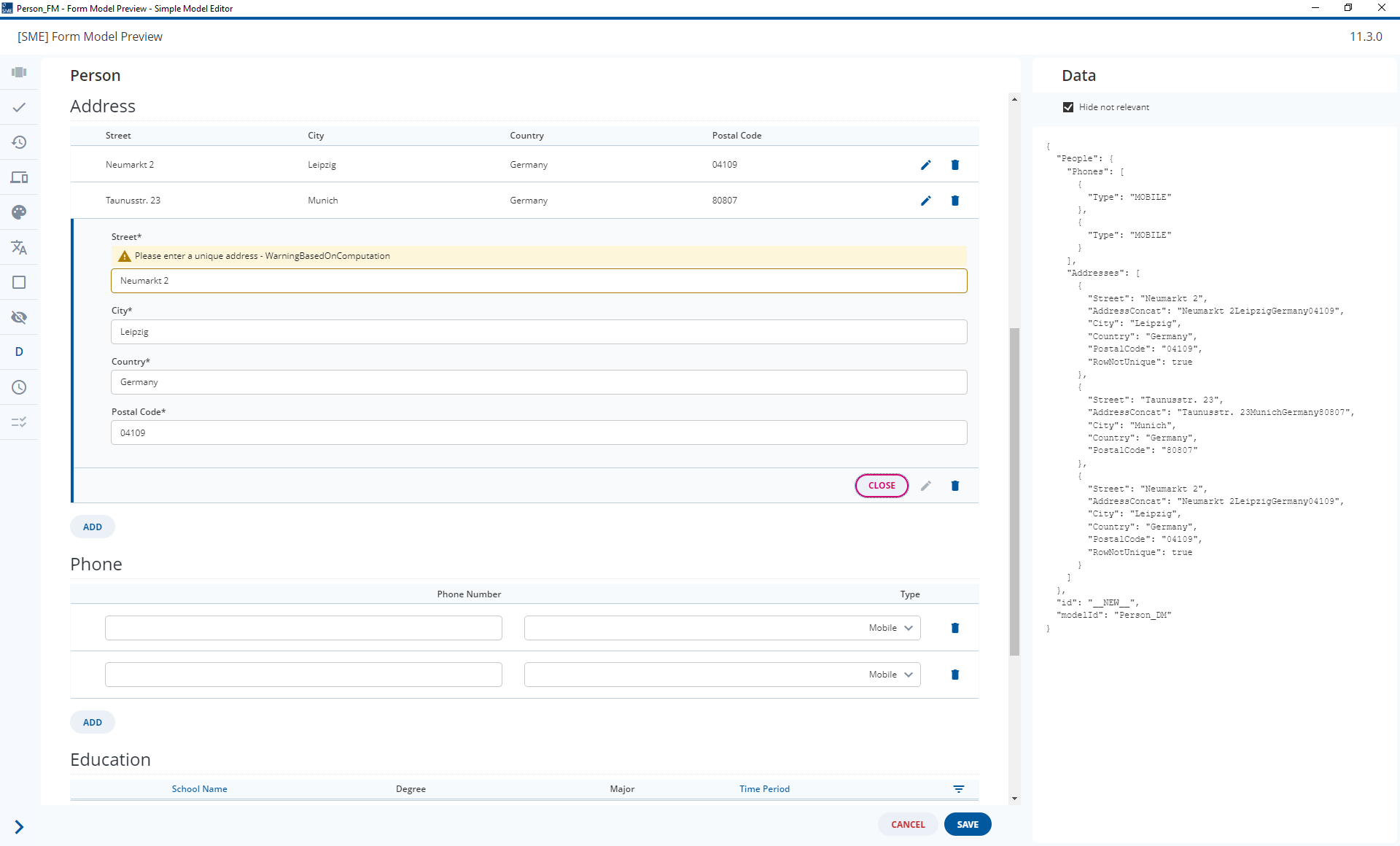
I did this in the attached 2024.06-ext2 models. Entering an Address that is not unique will trigger a Warning as soon as the address is complete. In the attached Screenshot I tabbed out of the Postal Code control and the Warning fired immediately.
Person_DM.json (52.6 KB)
Person_FM.json (27.4 KB)
As an aside, you should only do this if this is completely necessary as creating extra Helper Fields as we have done in this workaround can hurt performance.
Partial Validation doesn’t include all Fields all of the time for exactly this reason 
Thanks @malcolm-silver-ice,
I was able to get your workaround to work for us and that alleviates our problem for now.
Nevertheless, it would make sense if one or both of the variants I mentioned were possible. As you wrote, performance must always be taken into account.
I will therefore also ask our frontend developers whether they have any ideas.