In our project, we have a problem concerning rendering nested repeatable groups in generated PDFs with the printModel.
We have a nested data structure that we can’t change since we strongly depend on the customer’s XSD structure.
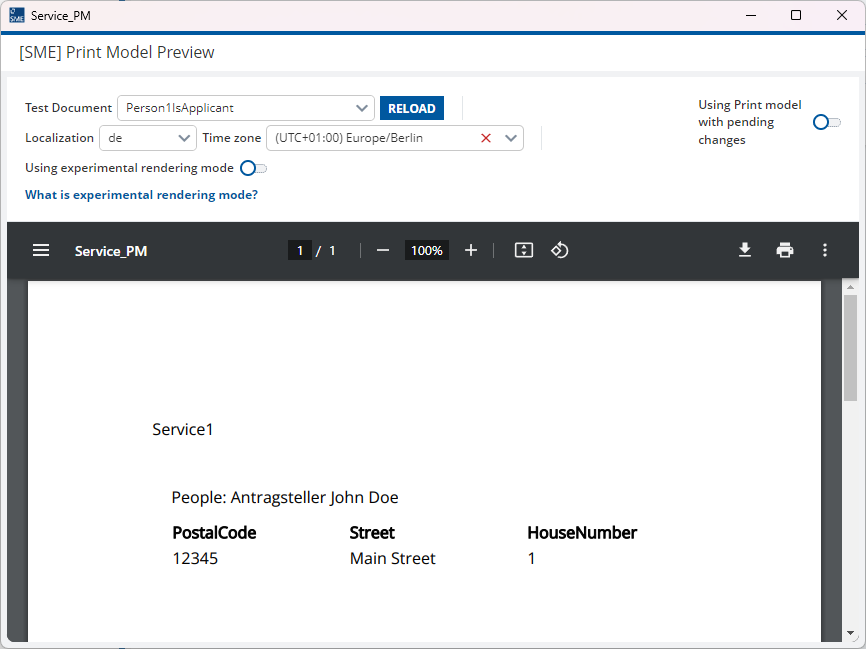
The goal is to render the first address of the person that has the type “Applicant”.
We have already tried different approaches to achieve this, like nested segments in the printModel, one referencing the people group and the other referencing the addresses group. But in that case, we had the problem that we can’t limit the addresses to the first one of the person with the type “Applicant”.
Another approach we tried was a segment referencing the people group and inside of that a switch checking if the person is an Applicant and if so rendering a table that references the addresses group with a row limit of 1. In that case, we get a runtime error "com.mgmtp.a12.print.engine.api.exception.PrintException: invalid state, expected to find only single fieldInstance".
Does anyone have an idea how to achieve this? We are currently on Release Line 2025.05-ext2.
## Model Structure

*   **root** (Group)
    *   **people** (Repeatable Group)
        *   **business** (Group)
            *   `Type` (Enumeration)
        *   **personalData** (Group)
            *   `name` (Field)
            *   `lastname` (Field)
            *   **addresses** (Repeatable Group)
                *   `postalcode` (Field)
                *   `street` (Field)
                *   `housenumber` (Field)
                *   `country` (Field)

## Example Data
*   **root**
    *   **people**
        *   **Person 1**
            *   **business**
                *   `Type`: "Applicant"
            *   **personalData**
                *   `name`: "John"
                *   `lastname`: "Doe"
                *   **addresses**
                    *   **Address 1**
                        *   `postalcode`: "12345"
                        *   `street`: "Main Street"
                        *   `housenumber`: "1"
                        *   `country`: "USA"
                    *   **Address 2**
                        *   `postalcode`: "54321"
                        *   `street`: "Second Street"
                        *   `housenumber`: "2"
                        *   `country`: "USA"
        *   **Person 2**
            *   **business**
                *   `Type`: "Co-Applicant"
            *   **personalData**
                *   `name`: "Jane"
                *   `lastname`: "Smith"
                *   **addresses**
                    *   **Address 1**
                        *   `postalcode`: "98765"
                        *   `street`: "Third Street"
                        *   `housenumber`: "3"
                        *   `country`: "Canada"
                    *   **Address 2**
                        *   `postalcode`: "56789"
                        *   `street`: "Fourth Street"
                        *   `housenumber`: "4"
                        *   `country`: "Canada"
what we want to achieve is to render only the first address of the person with the type “Applicant”, so in this case:
postalcode: “12345”street: “Main Street”housenumber: “1”