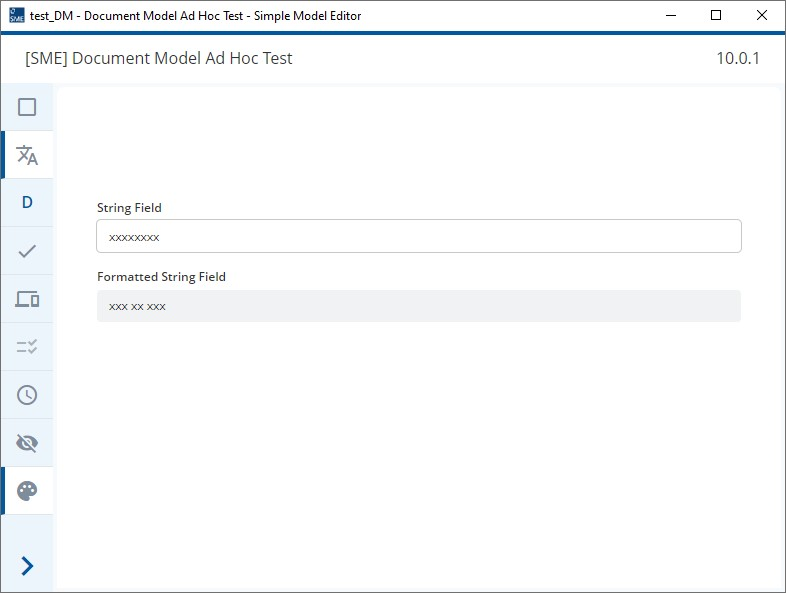
Hey, we have some strings that we get from another source and just want to display in form and overview models. But we want to display the strings formatted in another way than we get them. Let’s say the strings are just xxxxxxx, but we want to display them as xxx xx xxx. I had a look into the documentantion to see if there is some way to achieve this with expressions and/or computations but it seems to me, that there are no substring operations of any kind available. Did I miss something? Is there a proper and easy way to achieve this?
Kind regards
Chrissi
I believe this is what RangeAsString is for. See RangeAsString and RangeAsNumber.
Example from the docs is:
RangeAsString(IBAN, 1, 2) != "DE"
Hi @christina-soft-reed,
The Kernel Language has the following operators
RangeAsString(Field, Start, End)RangeAsNumber(Field, Start, End)
These operators are can be used to select a range of a string or number and then display it or work with it.
I tested this in the SME and the following rule worked for me:
Precondition: FieldFilled(string_field)
Calculation:
RangeAsString(string_field, 1, 3) + " " +
RangeAsString(string_field, 4, 5) + " " +
RangeAsString(string_field, 6, 8)
Please note, I modeled a fixed length in the data type configuration for both the field containing my original string, string_field, and the computed field. I set the Min and Max Length for string_field to 8 and set the values for the computed field to 10 to ensure no data was lost and that everything matched up.
Thanks a lot, I overlooked that one as it seems! 
If you don’t want to map the values inside of your documents via computations, you can pass a custom Converter to the Form Engine configuration as a prop.
export interface Converter {
	parseValue(
		path: ModelPath,
		uiValue: string,
		options?: Converter.ConversionOptions
	): { value?: FieldInstanceValue; parseError?: Converter.ParseError };

	formatValue(
		path: EntityInstancePath,
		value: FieldInstanceValue | object | undefined,
		options?: Converter.ConversionOptions
	): string;
}
Here you can implement a custom formatValue method that will rearrange your strings in any way you like.
The parseValue method is then used to adapt the values coming from the user input for the internal representation. The method is only interesting if your fields are editable.
A similar - if not identical - interface is offered by the Overview Engine.