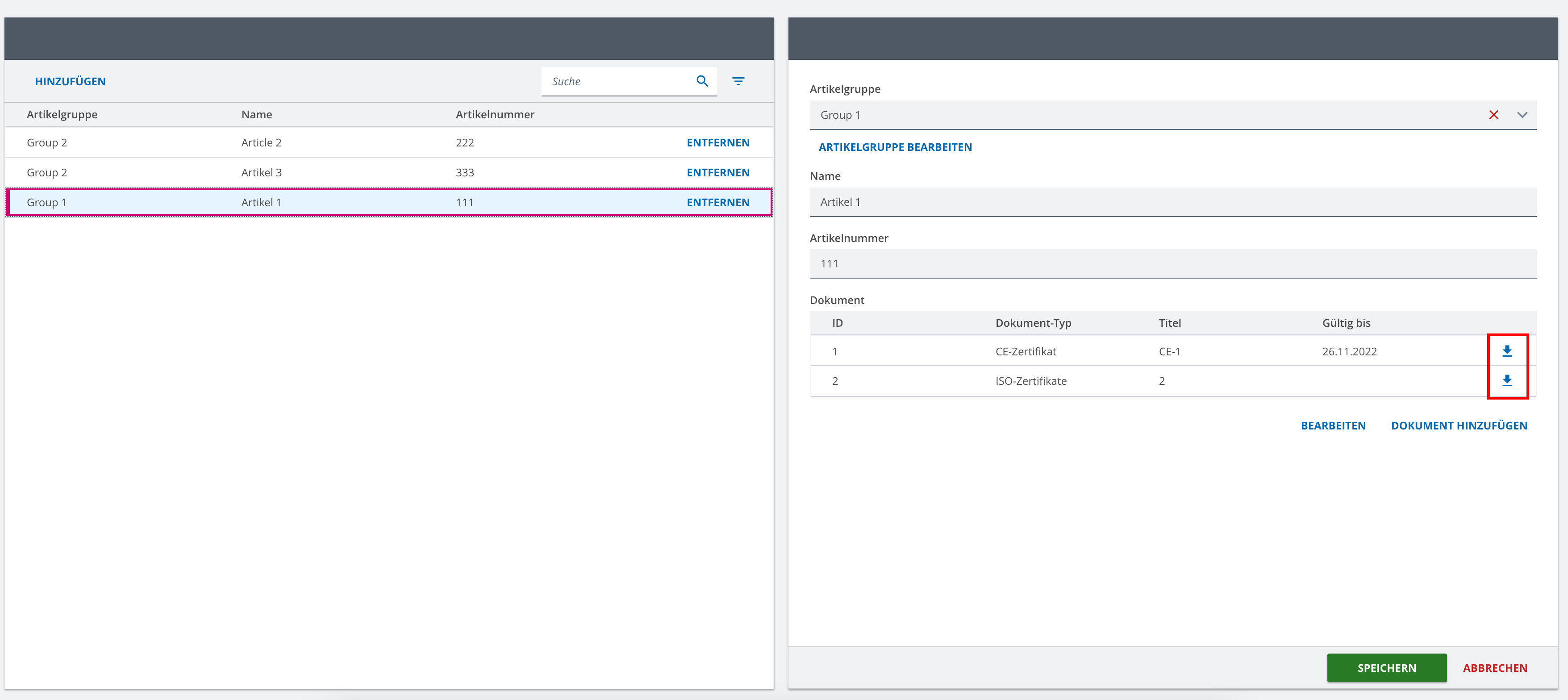
In my use case I have a form (in this concrete case, a CDM form) which contains a detached repeat as a Table List.
Every document entry in the table list can have an attachment added to it, which I want to download from a download button at the end of each row.
The download button was added by declaring it as a custom row action (with a custom event name), in the overview that is used for this detached repeat (overview for selected items).
Now my question is: how can I react on button clicks of these detached repeat rows and trigger some action?
@markus-agile-fog
@anon61393032 this should be fairly simple to solve 
In Form Engine documentation you can find a description and code example on how to do that.
Thank you.
I suppose that in this case I need to remove my custom row action from the overview, used in the detached repeat.
Instead, I will need to add the row action in the detached repeat, inside the form model. Am I right?
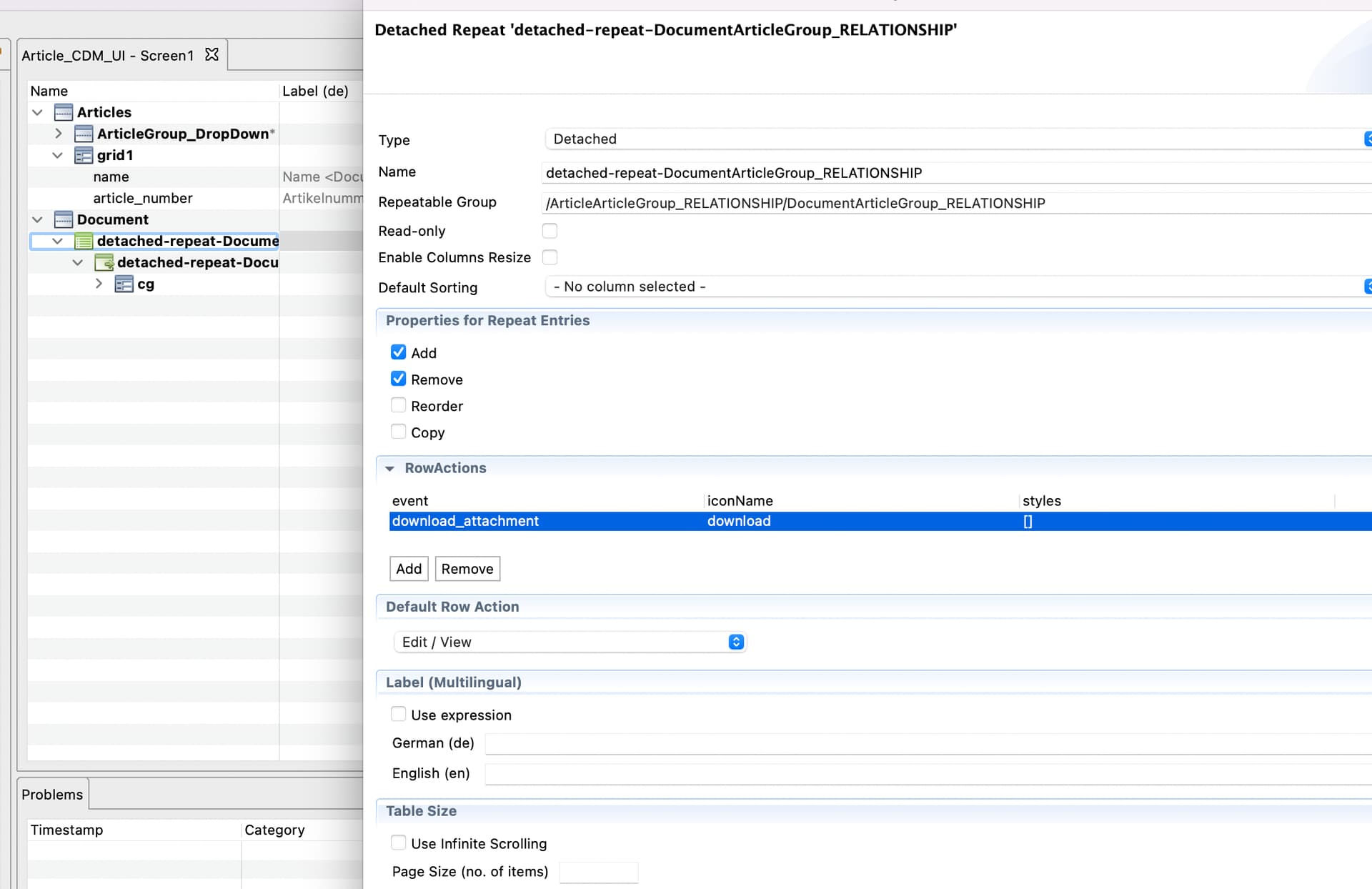
Currently, doing it this way I don’t get the download button displayed in the detached repeat table list:

What could I be doing wrong?
i did a local test with the preview application and was able to have the button in detached repeat of form model and also in the overview model consumed by relationship binding of form (i am not sure how your list is exactly modeled).
So if you do not have just forgotten to update your models i have no clue.
I forwarded your topic to our modelling experts maybe they have some more input.
In principle, when adding the row action to the overview used by the detached repeat, the button is showing.
It is just not triggering any event in the middleware that I created according to here. Regardless of registering the middleware in appsetup.ts or within my module, it doesn’t seem to get triggered by the button click.
Therefore I was thinking that maybe I would have to add the row action in the form model, instead of the overview.
I tried 3 approaches:
- Add row action in overview: button is shown, but no event can be seen in the middleware.
- Add row action in form model’s detached repeat: button is not visible, thus cannot be clicked
- Add row action in overview + form model: same behavior as in 1.
For completeness, my middleware looks like the following. It DOES get executed for various events. But it DOESN’T get executed (i.e. “middleware triggered” is not logged) in case I click the row action button.
export const onRowActionClickedMiddleware: Middleware<unknown, EngineState> =
  api => next => action => {
    // this DOES get executed some times, so the middleware should be registered correctly
    console.log("middleware triggered");

    if (Events.Repeat.customRowAction.match(action)) {
      const eventName = action.payload.eventName;
      const rowPath = action.payload.rowPath;

      // this DOES NOT get executed
      console.log(eventName, rowPath);

      // actual logic...
    }
    return next(action);
  };
I register it like so:
const module = (): Module => ({
	id: "ProjectModule",
	model: (): ApplicationModel => model as ApplicationModel,
	views: () => viewProvider,
	middlewares: () => [
		// ...
		onRowActionClickedMiddleware,
	],
});

export default module;
Thanks, now i understand.
You are working with cdm that uses relationships and therefore add the overview via bindings.
Unfortunately the custom row actions are not supported in Table List component of Relationships. It is not possible to hand over onRowButtonClick event.
// @com.mgmtp.a12.client\client-core\src\extensions\relationship\internal\ui\components\TableList.tsx

// ...
<OverviewEngine
	{...overviewProps}
	data={shownItems.map(({ documentJson }) => documentJson)}
	eventHandlers={{ onRowClick }} // <- the event handlers are overwritten in here
>
// ...
@henner-grey-void pointed me on a situation in sme where this becomes visible. When you try to create an overview model from within a binding configurations Models section via add button you will see that it is not possible to set custom row actions for that overview model.
Solution in my eyes only possible by using a custom component instead of Table List.
Description from getA12 Custom Relationship Component (content is above the linked anchor)
In addition to the default views mentioned above, projects can provide their own UI. To do so, they have to specify an own component provider as Relationship Engine property. The provider receives a component configuration and returns a React component providing one of the following interfaces:
ListProps - Provides properties required to show links in a readonly list. Views should use this interface to provide a UI similar to the table list.
SingleSelectionProps - Provides properties required to render a UI for the selection of a single link. Views should use this interface to provide a UI similar to the drop down selection.
MultiSelectionProps - Provides properties required to render a UI for the selection of multiple links at the same time. Views should use this interface to provide a UI similar to the quadro or dual pane selection.
But attention:
We consider customization of the components to be an experimental feature at the moment.
Thank you for the information. As this functionality is crucial for our client, we will need to take the custom component approach.
Can you give us any starting point/hint on how to start on that? I currently don’t know what the steps would be.
I tried to use a custom FormEngine component (with no customization yet, just default behavior) for my CDM form, but it just opens the form with an error.
I don’t know where to put the logic for a possible custom RelationshipEngine. Is there any example for that?
Or, as an alternative to using a custom row action button for triggering an event, would it work to use the click event on the entire row in our case? That would also suffice…
hi @anon61393032 after talking back to the a12 team i can tell you this is possibly not solvable atm.
Since this is based on experimental cdm there is no code API available to simply access the required parts for customization. We will follow up that topic in a discussion about filing a new requirement beginning next year.
For now the only thing I can tell you is, that the current implementation is a form-engine that implements a relationship-engine that implements an overview-engine (the Table List). To customize that you have to re-create the whole chain and I can not tell if there are maybe any internal inside that you can not access at all.
I have no workarround for the moment, I am sorry for inconvenience caused by that.
Hi @markus-agile-fog,
in the meantime, we found a very “ugly” workaround which is listening for the ActivityActions.push event and checking whether the detail view of the desired document model is to be opened. We stop the propagation of that event and instead trigger the download of the respective document. But this is a very questionable solution, as it also throws some errors in the background (but at least works).
We really need this functionality of custom row actions (or row click actions) in CDMs for our client. It is indispensable for them.
Can you somehow prioritize this in the implementation on A12 side?