ComputationRule throws error

Hi, I am trying to figure out why I get a specific DocumentValidationException
I am going through a call of computeAndValidateDocument of the DefaultDocumentService.
I have a document with a computed value and a computation which sets that value based on other values.
Now I am changing a referenced value from the outside and trigger that call on computeAndValidateDocument. Computation is fine but validation fails, and it doesn’t tell me why. I tried to debug into it ti find the specific scenario or rule I violated, but it just tells me that the computation fails with a VALUE_ERROR but doesn’t tell me what the actual problem is.

Because I am not able to share any specific structure, for security reasons, an example:
Lets say I have a document with a computed field and a computation: My computation has the following two rules:
[../Configuration/Active] == True → “true”
and
[../Configuration/Active] == False → “false”

I am changing Configuration/Active to True compute the document and save it → the document gets saved with the computatedField “true”
When I am changing Configuration/Active to False and go through computeAndValidateDocument again, the value does not change - well it stays the same even though the Configuration/Active vaule in the exact same document is set to False, so everything is there and it still doesn’t change.
Afterwards validation fails, at this Computation, but without any hint.

I do not know what exactly is validated anyway. It should compute, which it doesn’t, and the validation should succeed, but not fail without any explanation.

What does a VALUE_ERROR mean? Does ist mean, that the computed value in the document contradicts the newly computed value? That would be my guess.

Any idea?

Its basically the same case as in Computation fails when a value is already set … but another computation.

Any tips how I can debug into this? I can get as deep as CheckCommand.formalePruerfung and as high as DocumentValidationResultImpl.addError but that is it, I can’t or don’t know how to debug into the exact logic which leads to the VALUE_ERROR.

Hi @raiko-static-field,

Thanks for the detail in this post. When you say

Does this mean the the Field [../Configuration/Active] has the Data Type “Boolean”? What about the Computed Field, is that a “Boolean” or a “Confirm” Field?

I’m asking because in your linked thread you wrote.

This incorrectly suggests that a Field with the Data Type “Confirm” can be set to “False”, see Confirm Fields docs.

If my assumption is correct, you are switching a Computed Confirm Field between “true” and “null”. As you are working in 2023.06, this might mean that you are bumping into an issue that we raised in A12-16238 and fixed in 2024.06-ext2. Basically the issue is that you could not set a Field to “null” using a computation in the backend.

There is however a discourse post about this with a code snippet showing how you could work around this. How do I recompute an existing document in the backend? - #10 by jlemsky

Did I guess right?

Alternatively, the modeling solution would be to change the computed Field from the Data Type “Confirm” to “Boolean” and compute to the values “true” and “false”.

Hi, thank you for your answer :).

Actually, the Field is of Data Type String. So it reminded me of the old case but it computes a different type of value :frowning:

Hi @raiko-static-field,
just to be sure, Configuration/Active is of type Boolean and the computed field is of type String, right?

Ok, maybe it helps if I lay out the structure of all fields involved. From my perspective, and according to the error I get, I do not think that other fields might pose a problem here, but maybe they do in a way I would not expect.

This is the relevant structure of all Fields dependent on another:

  • Field [../Configuration/Active] - Data Type Boolean

  • Field [../Configuration/ActivePreset] - Data Type Boolean

  • Field [../Configuration/ActivePresetValue] - Data Type Enumeration (TRUE/FALSE)

  • Field [../State] Data Type Enumeration (ONE, TWO, THREE)

  • Field [ActivatedInput] with a TypeDefinition “TrueFalse” → which is basically TRUE/FALSE

  • Validation Rule [ActivatedInputMissing]

    • FieldFilled(../State) And [../Configuration/ActivePreset] != True And FieldNotFilled(ActivatedInput)
  • Computed Field [ActivatedPreset] with a TypeDefinition “TrueFalse” → which is basically TRUE/FALSE

  • Computation Rule [ComputationActivatedPreset] computes [ActivatedPreset]

    • FieldFilled(../Configuration/ActivePreset)
      And [../Configuration/ActivePreset] == True → [../Configuration/ActivePresetValue]
  • Computed Field [Activated] with a TypeDefinition “TrueFalse” → which is basically TRUE/FALSE

  • Computation Rule [ComputationActivated] computes [Activated] -

    • FieldFilled(../Configuration/ActivePreset) And [../Configuration/ActivePreset] == True → [ActivatedPreset]
    • FieldFilled(ActivatedInput) And (FieldNotFilled(../Configuration/ActivatedPreset) Or [../Configuration/ActivatedPreset] == False) → [ActivatedInput]
  • Computed Field [ActivatedLabel]

  • Computation Rule [ComputationActivatedLabel] -

    • [../Configuration/Active] == True and FieldFilled(Activated) and [Activated] == "TRUE"→ “true”
    • [../Configuration/Active] == True and FieldFilled(Activated) and [Activated] == “FALSE” → “false”
    • [../Configuration/Active] == True and FieldNotFilled(Activated) → “none”
    • FieldNotFilled(../Configuration/Active) or [../Configuration/Active] == False → “none”

I have a document already saved which contains the following values

<Document>
  <ActivatedLabel>none</ActivatedLabel>
  <Activated>FALSE</Activated>
  <ActivatedPreset>FALSE</ActivatedPreset>
  <Configuration>
    <Active>false</Active>
    <ActivePreset>true</ActivePreset>
    <ActivePresetValue>FALSE</ActivePresetValue>
  </Configuration>
</Document>

I am now changing the Configuration part (hard - I replace it entirely) to the following structure:

<Document>
  <ActivatedLabel>none</ActivatedLabel>
  <Activated>FALSE</Activated>
  <ActivatedPreset>FALSE</ActivatedPreset>
  <Configuration>
    <Active>true</Active>
  </Configuration>
</Document>

when I go through kernelDocumentService.computeDocument() I get no error and the document still looks the same, even though I expect the Computation Rule [ComputationActivatedLabel] - [../Configuration/Active] == True and FieldFilled(Activated) and [Activated] == “FALSE” → “false” do its work and set to false.
After that the kernelDocumentService.validateDocument() throws the VALUE_ERROR.

Sorry it just takes a lot of time to reconstruct the structure :frowning: that is why I tried to describe it superficial, but I get that this might not help at all.

I hope this makes thing clearer :slight_smile:

I detected that I violate the ComputationActivated Computation with the new Configuration setup.

<Document>
  <ActivatedLabel>none</ActivatedLabel>
  <Activated>FALSE</Activated>
  <ActivatedPreset>FALSE</ActivatedPreset>
  <Configuration>
    <Active>true</Active>
  </Configuration>
</Document>
  • FieldFilled(../Configuration/ActivePreset) And [../Configuration/ActivePreset] == True → [ActivatedPreset]
  • FieldFilled(ActivatedInput) And (FieldNotFilled(../Configuration/ActivatedPreset) Or [../Configuration/ActivatedPreset] == False) → [ActivatedInput]

The computed Field is a TrueFalse Type, which only consists of those two types (True and False). This, I guess, won’t work, and will result in some form of error, right? If yes: why do I get an error for the ComputationActivatedLabel and not for ComputationActivated ?

Hi @raiko-static-field

I was just about to post the same thing.

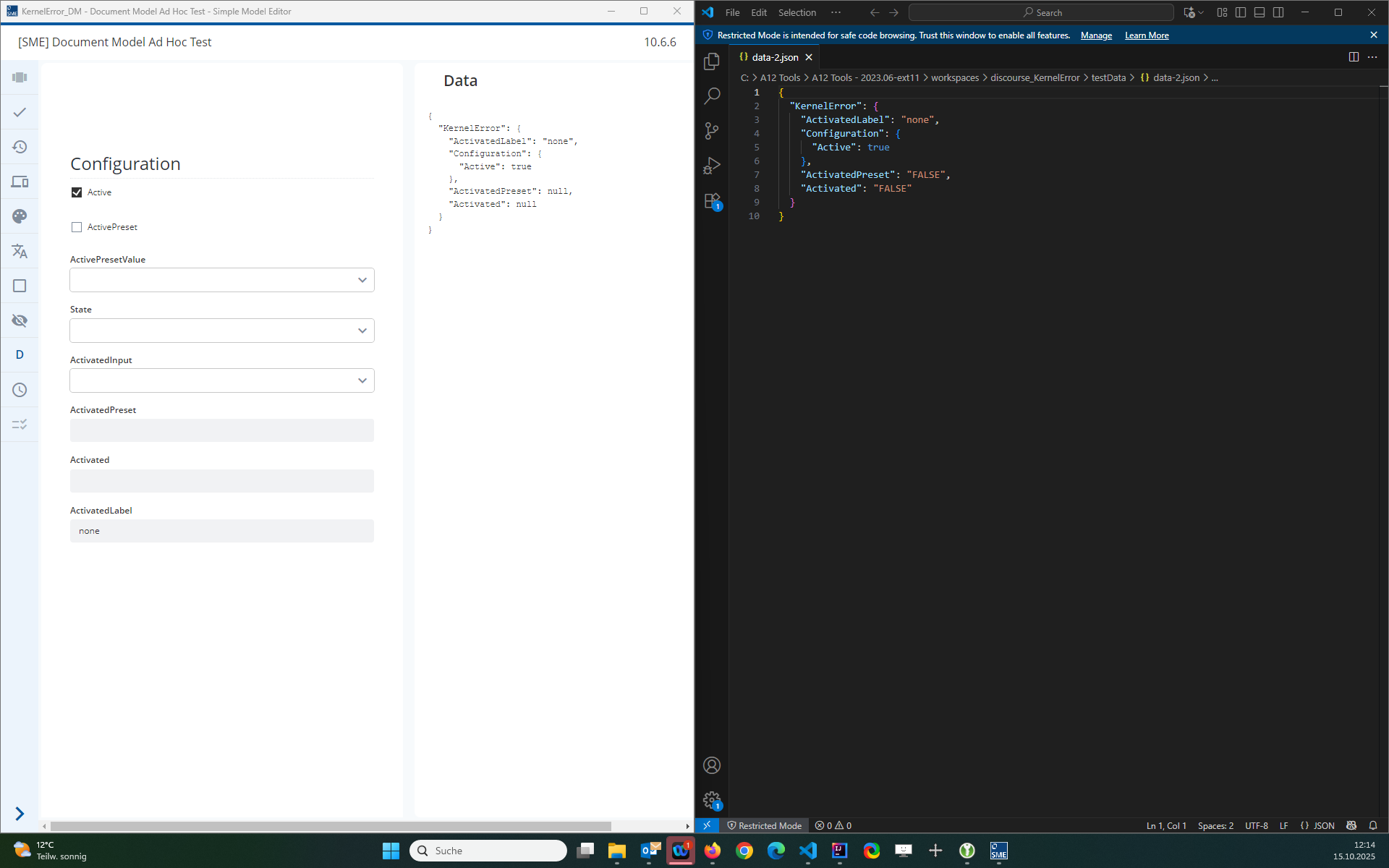
I modeled your example and tested the data using the Ad hoc test in the SME. 2023.06-ext11, SME 10.6.6 Models.
KernelError_DM.json (12.0 KB)
data-1.json (229 Bytes)
data-2.json (164 Bytes)

When I load data-2 into the ad-hoc test, the values are automatically recomputed so that ActivatedPreset and Activated are set from “FALSE” to null. Passing a document where these values are “FALSE” will lead to a value error.

The background is that your TRUE/FALSE type definition actually has 3 states, TRUE/FALSE/null. You need to make the Computation Rules really explicit and ensure that you always calculate to either TRUE/FALSE. If a certain combination of data is not covered, then the value null will be expected. In the case of ComputationActivated, you don’t have a precondition that covers the case when ActivatedInput is not set.

Re:

I think that this might be related to the order or the rules in the json. @gildardo-cached-canyon is this right? If this rule comes first in the json then it will be evaluated first and throw the error?

The Computation Rule for ComputationActivatedLabel is also in conflict with the Data. The Field ActivatedLabel has the value "none" but the Computation rule evalues to "false" due to the precondition:

[Configuration/Active] == True and FieldFilled(Activated) and [Activated] == "FALSE"

Ok, does this really explain the error behind the Label?
Because at the moment ComputationActivated should throw an error or maybe trying to set “TrueFalse” to null
but not the label computation, which would be able to compute, if the underlying fields could be computed.
Can I verify this through debugging somehow? I really really need the real error and not the surface bubble :slight_smile:

I understand your desire to find the root of the problem and I’ve asked @gildardo-cached-canyon to take a look at it as he has more experience with the technical side of the Kernel that I do.

That being said, what is the use-case for sending computed values to Data Services to then recompute them? I believe that if you send this data with these computed Field values undefined, then everything will work as there will be no conflicting values.

We use configuration values to provide a few documents as a multitude of documents with diferring ui.
Some parts need to be shown, while other don’t need to be. Some parts need to be reduced to a certain set of values while in other cases we don’t need it.
Based on these cases, we use configuration values to control what is what. But we also need to be able to change these configurations.

Example:
I have an UI which is based on the Document “Activate” :slight_smile: With this Document+UI I am able to provide users a mean to activate or de-activate the ability to login :). But I have two groups of users, users who are allowed to change this and users who are not allowed to change this.

Group A - admins
They can change this value as they want, so I set Active=true and ActivePreset=FALSE.
Group B - others
They should not change this value, but they are still able to login, so I set Active=TRUE and ActivePreset=true and ActivePresetValue=TRUE.

Now I change my mind and want to change the ability to control this behavior for a certain group. I need to update the configuration for that group, but I cannot delete or recreate document, because other values would be lost. I need to only change this configuration state.

Our current solution:
we replace the configuration part and compute the whole document, because, as seen above, some computations are dependent on these configuration. But this means, that already computed values are also sent.

Hi @raiko-static-field,
with the detailed structure of your DM, I understand the situation and can give an explanation. Thanks for the information, that helped me a lot (@malcolm-silver-ice: thank you for the model and data, that helped me as well).

To understand this situation, there is something I have to explain beforehand:

  • Out of a computation rule in a DM, computation code is generated, but also validation code. In the latter case, the a simplified form of the generated validation rule would be as follows:
    FilledField(<computedField<) and <common precondition> and <precondition 1> and [<computedField>] != <computed value 1>.
  • In the method DefaultDocumentService#computeAndValidateDocument, the computation is executed, the computed values are added to the document (if not formal errors are present) and last but not least, the validation of the modified document is executed.

For the second data set, we can expect the following focusing on the computations ComputationActivated and ComputationActivatedLabel:

“Computation phase”

  1. ComputationActivated:
    a. Precondition 1 is not met since Configuration/ActivePreset is not filled.
    b. Precondition 2 is not met as well since ActivatedInput is not filled.
    c. This means that Activated is not computed at all.
  2. ComputationActivatedLabel: This computation takes the result from the last computation into account.
    a. Precondition 1 and 2 are not met since Activated is not filled (it could not be computed)
    b. Precondition 3 is met and ActivatedLabel is computed to “none”

“Apply phase” (server-side)
In the A12 version 2023.06 only actually computed values are added to the document, this means, Activated is not changed in the original document, as you observed.
In the A12 version 2024.06-ext2, the DS configuration mgmtp.a12.dataservices.documents.computation.cleanup-error-and-not-computed-value.enabled was introduced to be able to have the following behavior: all field instances of a computed field are cleared (set to null) and afterwards all actually computed values are added to the document. The latter behavior is from my point of view the way how a computation result should be applied to a document.

“Validation phase”

  1. Rule generated from ComputationActivated:
FieldFilled(Activated) And (
    (
        FieldFilled(Configuration/ActivePreset) And [Configuration/ActivePreset] == True
        And [Activated] != [ActivatedPreset]
    ) OR (
        FieldFilled(ActivatedInput) And (FieldNotFilled(Configuration/ActivePreset) Or [Configuration/ActivePreset] == False)
        And [Activated] != [ActivatedInput]
    )
)

a. FieldFilled(Activated)true
b. FieldFilled(Configuration/ActivePreset) And [Configuration/ActivePreset] == True And [Activated] != [ActivatedPreset]false since Configuration/ActivePreset is not filled
c. Because of the OR the next subcondition must be evaluated
d. FieldFilled(ActivatedInput) And (FieldNotFilled(Configuration/ActivePreset) Or [Configuration/ActivePreset] == False) And [Activated] != [ActivatedInput]false since ActivatedInput is not filled
f. This rules does fire (does not produce any error)

  1. Rule generated from ComputationActivatedLabel:
FieldFilled(ActivatedLabel) And
(
    (
        [Configuration/Active] == True and FieldFilled(Activated) and [Activated] == "TRUE"
        And [ActivatedLabel] != "true"
    ) OR (
        [Configuration/Active] == True and FieldFilled(Activated) and [Activated] == "FALSE"
        And [ActivatedLabel] != "false"
    ) OR (
        [Configuration/Active] == True and FieldNotFilled(Activated)
        And [ActivatedLabel] != "none"
    ) OR (
        FieldNotFilled(Configuration/Active) Or [Configuration/Active] == False
        And [ActivatedLabel] != "none"
    )
)

a. FieldFilled(ActivatedLabel)true
b. [Configuration/Active] == True and FieldFilled(Activated) and [Activated] == "TRUE" And [ActivatedLabel] != "true"false since [Activated] != "TRUE"
c. Because of the OR the next subcondition must be evaluated
d. [Configuration/Active] == True and FieldFilled(Activated) and [Activated] == "FALSE" And [ActivatedLabel] != "false"true since "none" != "false" (remember that ActivatedLabel is filled with “none”
e. We have a true in the OR and the next subcondition must not be evaluated
f. The rule fires and this is what you see.

The validation message is an error created by the SME and can be seen directly in the JSON file.

To solve the problem, you should avoid setting computed values by yourself (in this case Activated and ActivatedLabel), you should let the Kernel computations do that for you (this is indeed a good practice).
Other solution would be what I mentioned before, to simulate what the configuration mgmtp.a12.dataservices.documents.computation.cleanup-error-and-not-computed-value.enabled does, or migrate to that A12 version and activate the configuration.

Hi, thank you :). The example and the step by step explanation helped me a lot to understand what is happening, and what I need to consider in the future.

Thank you very much!