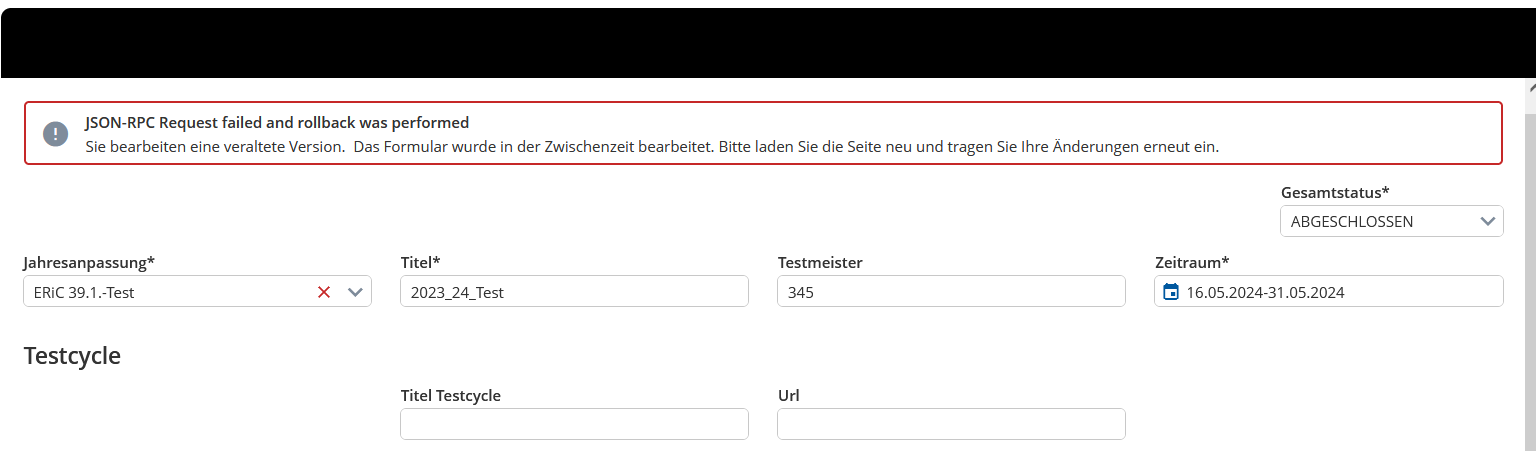
When my server code throws an IntegrityException the following error is shown in the UI:
Is there a way of customizing how the error is shown in the UI? For example suppressing the first line “JSON-RPC Request failed…” or just hiding the error Message completely (which I might have to do in some cases)?
Hello,
The default title & description are derived from the json rpc response, you can overwrite the title and description of the error message, in case your project is project template-based, you can change your localization/resources/en_US.ts as following:
error: {
        add_document: {
            error: {
                title: "new error title",
                description: "new description"
            }
        },
Please notice to change the typing at localization/resources/key.ts as well
After going over the problem together with @loi-risen-dale , he found out that in my case the key rpc.operation.error can be used to change the error title. Thanks @loi-risen-dale ! 
Btw, there is a ticket to enable customization and consistency of error messages in the UI: A12-15373