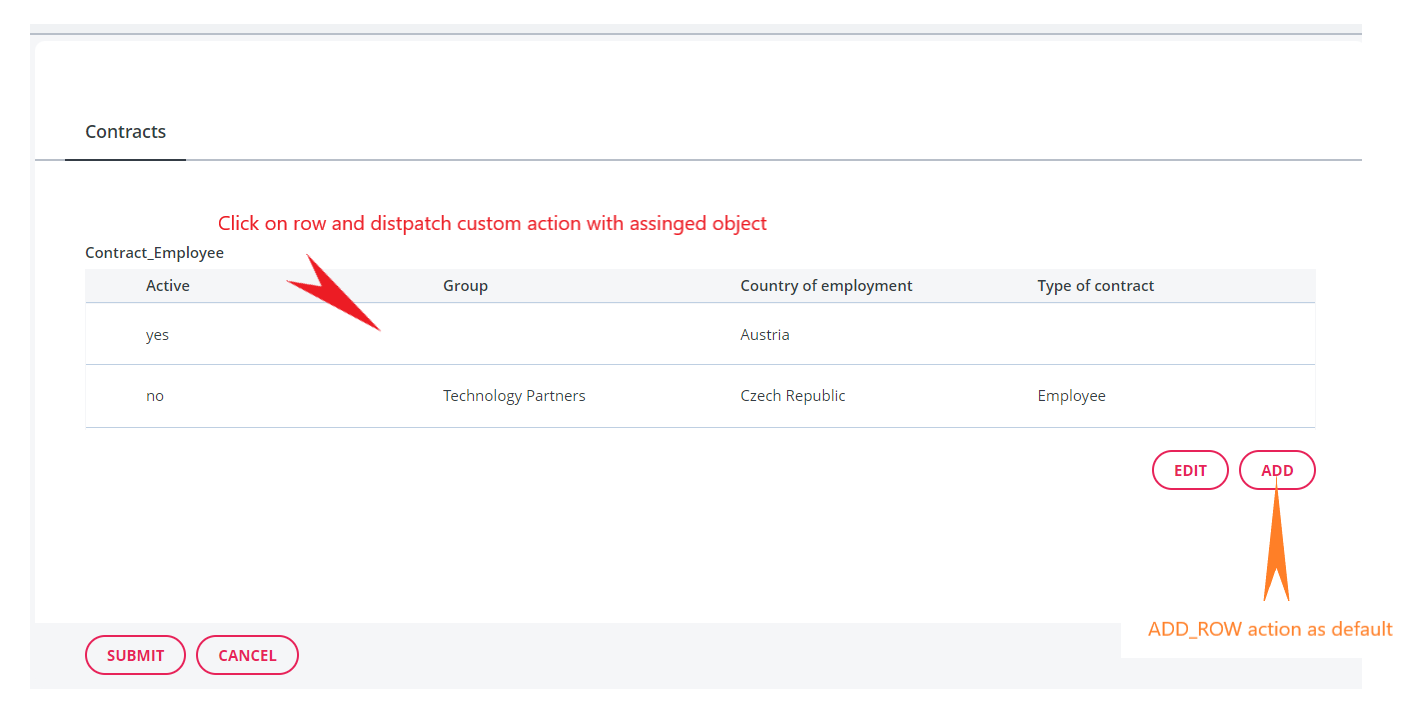
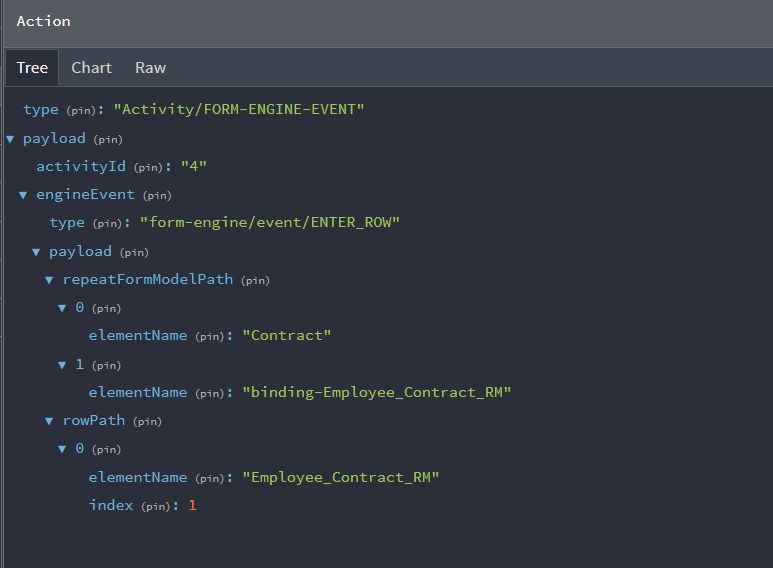
Hi, in our project we are using CDM. We would to custom ENTER_ROW action to dispatch another action with an assigned object (including an object of that row clicked). But the ADD_ROW action still needs to be kept as default.
I tried to use Use CDM child activities but the ADD button also dispatched the same descriptor with ENTER_ROW, so it doesn’t match with our expectations.
This is our a12 versions:
    "@com.mgmtp.a12.base/base-model-api": "27.1.0",
    "@com.mgmtp.a12.client/client-core": "14.6.0",
    "@com.mgmtp.a12.dataservices/dataservices-access": "36.3.6",
    "@com.mgmtp.a12.formengine/formengine-core": "36.6.2",
    "@com.mgmtp.a12.kernel/kernel-core-runtime-api-ts": "28.5.0",
    "@com.mgmtp.a12.kernel/kernel-md-facade": "28.5.0",
    "@com.mgmtp.a12.overviewengine/overviewengine-core": "36.5.0",
    "@com.mgmtp.a12.uaa/uaa-authentication-client": "7.5.0",
    "@com.mgmtp.a12.utils/utils-connector": "6.0.5",
    "@com.mgmtp.a12.utils/utils-localization": "5.7.0",
    "@com.mgmtp.a12.utils/utils-localization-react": "5.7.0",
    "@com.mgmtp.a12.utils/utils-logging": "5.7.0",
    "@com.mgmtp.a12.widgets/widgets-core": "36.5.0",
How can I do that. Thank you!
Hi,
A12 currently doesn’t support the customization of relationship ui components like the TableList component in this case.
However, there might be a workaround:
When not using the “use CDM child activities” feature, the TableList behaves similar to a Detached Repeat and shows a Detail Screen, when adding a new link or editing an existing one.
To achieve this behavior, the respective Form Engine Event actions (Events.Repeat.addRow and Events.Repeat.enterRow) are dispatched.
The Form Engine allows customizing how these events are handled. This can be done by providing a custom dispatchConfiguration when setting up the FormEngine component.
In this dispatchConfiguration, for the enterRow case a custom action can be dispatched before executing the default behavior. This should allow you to achieve your desired custom behavior.
More details can be found in the developer documentation for the Form Engine under Behavior Customization here: GetA12 Login
Greetings
Conrad
Hi @claessig,
I did some code to trying to custom DefaultDispatchProps
export const CustomRelationshipFormEngine = (props: FormEngineViews.FormEngineProps): React.JSX.Element => {
	const stateProps = useSelector(engineStateSelector);
	const dispatch = useDispatch();
	const dispatchProps = FormEngineActions.mapDispatchToProps(dispatch, props);

	function engineStateSelector(state: object): Partial<DefaultStateProps> {
		// this is the necessary adaption for cdd
		const adaptedState = cddActivityStateAdapter(props.activity)(state);
		return FormEngineStateAdapter.mapStateToProps(adaptedState, {
			...props,
			formModelMap: { ...CustomFormModelMapWithRelationship, ...props.formModelMap }
		});
	}

	const customDispatchProps: DefaultDispatchProps = {
		...dispatchProps,
		eventHandlers: {
			...dispatchProps.eventHandlers,
			repeat: {
				...dispatchProps.eventHandlers.repeat,
				enterRow(rowPath: EntityInstancePath, repeatFormModelPath: ModelPath, triggerElement?: "edit-button" | "row") {
					// Do something
				}
			}
		}
	};

	// using the unconnected variant, so you need to provide all props yourself
	return <FormEngineViews.FormEngineTpl {...props} {...stateProps} {...customDispatchProps} />;
};
but it seems like do not work. It doesn’t trigger code inside enterRow(...)
Besides that, with the params rowPath, repeatFormModelPath and triggerElement how can I get an assigned object (instance, data…)? Of course I’m using CMD form with detached-repeat
Or another option:
I intend to use middleware to custom action ENTER_ROW. But like I asked above, in Middleware, how can I get an assigned object by using rowPath and repeatFormModelPath?
Many thank!
Hi.
I just realized that my proposed workaround with the dispatch configuration cannot work. Sorry for the confusion. The TableList already dispatches the actions and doesn’t use the event handler api which would have allowed the customization.
What you can try is to write a custom middleware, which also reacts to the Events.Repeat.enterRow action (or better the formEngineEvent action containing it).
In this middleware you can select the current activity data via ActivitySelectors.data.
The dataHolder of the activity will have the structure described by the type ScdmDataHolderShape.
The document used for the form engine can be found in the data holder under data.cddState.cachedCdd.cdd.
The rowPath from the enterRow payload is an EntityInstancePath for this document.
So, using the kernel api, with
new DocumentServiceFactory().getDocumentService().getAssignedObject(document as GroupInstance, rowPath) you should get the group instance value of the entered row.
Then you can dispatch your custom action at the end of the middleware.
I hope, this is a better answer.
Greetings
Conrad
Thank you, I will try and let you know the result.
Additionally, can I ask what the purpose of cachedCdd (in cddState) and documentGraph is?
When should I use documentGraph and when should I use cachedCdd?
The CDM feature uses the documentGraph as the leading data structure. Multiple documents, which are connected via links are edited together. The document graph is an instance of the Composed Document Model (CDM) so to say.
The Form Engine and the Kernel Validation aren’t compatible with the document graph, so in order to show the data in the Form Engine and validate it, a plain document is calculated from the document graph and stored in the cachedCdd state. It is updated for every change in the document graph.
So, when an api is used which requires a Document which is an instance of the CDM and contains the data of the root and all linked entities, the cdd should be used.
When you on the other hand are only interested in a “sub document” of the document graph, e.g. some linked entity instance, like the one represented as row in the TableList, then this instance could be used from the Document Graph directly. You would have to know the document reference (docRef) of the sub doc you are interested in.
I would say the document graph structure is rather low level. Working with the cdd is easier, since it is the equivalent of the old form engine data state and is compatible to the apis existing before the introduction of the CDM.
Thank you for your answer @conrad-solid-stream,
I implemented your suggestion by using getAssignedObject and use rowPath: EntityInstancePath and it work well now.
const cdd = yield select(CddSelectors.cdd(action.payload.activityId));

assertDefined(cdd, "Compose data of Contracts document is missing!");

const assignedObject = documentService.getAssignedObject(cdd.document as GroupInstance, action.payload.rowPath);

assertCondition(EmployeeContractHelpers.isContractDocument(assignedObject), "assignedObject is not Contract type");

// Now assignedObject available for using
Also thank for the explanation about cddState and documentGraph. It help me to understand more about CDM
Thank you.