I have downloaded the latest A12 Data Modeler (24.1.0).
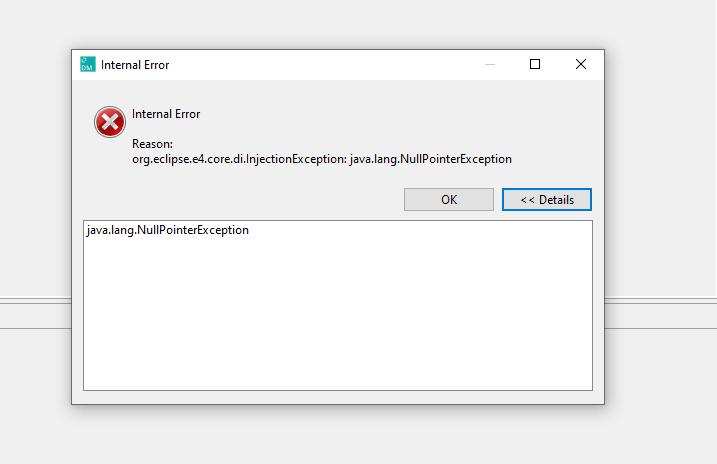
If I open up my “model” JSON file, I get a NullPointerException.
Are there some log files I can have a look at? There is no stack trace provided
My JSON file looks like this :
I have downloaded the latest A12 Data Modeler (24.1.0).
If I open up my “model” JSON file, I get a NullPointerException.
Are there some log files I can have a look at? There is no stack trace provided
My JSON file looks like this :
{
“header” : {
“id” : “VordruckOptionen”,
“modelType” : “document”,
“modelVersion” : “24.0.0”,
“locales” : [ {
“code” : “de”
} ],
“labels” : [ ],
“annotations” : [ {
“name” : “savedAt”,
“value” : “2020-10-14T11:24:04.372+02:00”
} ],
“modelReferences” : [ ]
},
“content” : {
“modelInfo” : {
“name” : “VordruckOptionen”,
“immutable” : false
},
“modelConfig” : {
“decimalSeparator” : “.”
},
“modelRoot” : {
“rootGroups” : [ {
“type” : “Group”,
“id” : “group_a4d5e”,
“name” : “options”,
“Group” : {
“repeatability” : 1,
“elements” : [ {
“type” : “Field”,
“id” : “field_formType_option”,
“name” : “formType”,
“Field” : {
“fieldType” : {
“type” : “EnumerationType”,
“EnumerationType” : {
“values” : {
“mainform” : {
“de” : “Hauptvordruck”
},
“attachment” : {
“de” : “Anlage”
}
}
}
},
“label” : {
“de” : “Vordrucktyp”
}
}
}, {
“type” : “Field”,
“id” : “field_printType_option”,
“name” : “printType”,
“Field” : {
“fieldType” : {
“type” : “EnumerationType”,
“EnumerationType” : {
“values” : {
“gray” : {
“de” : “Grau”
},
“green” : {
“de” : “Grün”
}
}
}
},
“label” : {
“de” : “Druck”
}
}
}, {
“type” : “Field”,
“id” : “field_landscape_option”,
“name” : “landscape”,
“Field” : {
“fieldType” : {
“type” : “EnumerationType”,
“EnumerationType” : {
“values” : {
“portrait” : {
“de” : “Hoch”
},
“landscape” : {
“de” : “Quer”
}
}
}
},
“label” : {
“de” : “Format”
}
}
}, {
“type” : “Field”,
“id” : “field_4c75b”,
“name” : “gapsInNumbering”,
“Field” : {
“fieldType” : {
“type” : “EnumerationType”,
“EnumerationType” : {
“values” : {
“Yes” : {
“de” : “ja”
},
“No” : {
“de” : “nein”
},
“Inherit” : {
“de” : “von VZ übernehmen”
}
}
}
},
“label” : {
“de” : “Lücken in der Zeilennummerierung sind zulässig”
}
}
}, {
“type” : “Field”,
“id” : “field_359ce”,
“name” : “markEmpty”,
“Field” : {
“fieldType” : {
“type” : “EnumerationType”,
“EnumerationType” : {
“values” : {
“Yes” : {
“de” : “ja”
},
“No” : {
“de” : “nein”
},
“Inherit” : {
“de” : “von VZ übernehmen”
}
}
}
},
“label” : {
“de” : “Kennzeichnung von Freizeilen”
}
}
}, {
“type” : “Field”,
“id” : “field_ec778”,
“name” : “nextNumberMode”,
“Field” : {
“fieldType” : {
“type” : “EnumerationType”,
“EnumerationType” : {
“values” : {
“Keep” : {
“de” : “Erhalt”
},
“Increase” : {
“de” : “Erhöhung”
},
“Inherit” : {
“de” : “von VZ übernehmen”
}
}
}
},
“label” : {
“de” : “Automatische Anpassung nachfolgender Zeilennummern beim Einfügen neuer Zeilen”
}
}
}, {
“type” : “Field”,
“id” : “field_ec779”,
“name” : “shortenKennzahlen”,
“Field” : {
“fieldType” : {
“type” : “EnumerationType”,
“EnumerationType” : {
“values” : {
“yes” : {
“de” : “Ja”
},
“no” : {
“de” : “Nein”
}
}
}
},
“label” : {
“de” : “Abgekürzte Darstellung der Kennzahlen”
}
}
}, {
“type” : “Field”,
“id” : “field_8d9wj”,
“name” : “vordruckNumber”,
“Field” : {
“fieldType” : {
“type” : “StringType”,
“StringType” : {
“errorMessage” : {
“de” : “Die Vordrucknummer muss eine maximal zweistellige Zahl (0-99) sein.”
},
“maxLength” : 2,
“pattern” : “[1]+$”
}
},
“label” : {
“de” : “Vordrucknummer”
}
}
}, {
“type” : “Field”,
“id” : “field_p9bw5”,
“name” : “shortName”,
“Field” : {
“fieldType” : {
“type” : “StringType”,
“StringType” : {
“errorMessage” : {
“de” : “Der Vordruckname darf max. aus 20 Zeichen bestehen. Der Vordruckname beginnt mit einem Großbuchstaben und danach folgen Buchstaben, Ziffern, Unterstrich, Minus oder Umlaute.”
},
“maxLength” : 20,
“pattern” : “[2][-A-Za-z0-9_ÜÖÄüöä]+$”
}
},
“label” : {
“de” : “Kurzname”
}
}
}, {
“type” : “Field”,
“id” : “field_p9bw6”,
“name” : “showFormKey”,
“Field” : {
“fieldType” : {
“type” : “BooleanType”
},
“label” : {
“de” : “Formularschlüssel anzeigen”
}
}
}, {
“type” : “Field”,
“id” : “field_p9bw7”,
“name” : “anleitung”,
“Field” : {
“fieldType” : {
“type” : “StringType”
},
“label” : {
“de” : “Zugeordnete Anleitung”
}
}
}, {
        "type" : "Field",
        "id" : "hidden_field_anleitung",
        "name" : "hiddenFieldAnleitung",
        "Field" : {
          "fieldType" : {
            "type" : "StringType"
          },
          "label" : {
            "de" : "Zugeordnete Anleitung"
          }
        }
      }, {
        "type" : "Rule",
        "id" : "rule_ac4c5",
        "name" : "vordruckNumberIfFormKeys",
        "Rule" : {
          "errorEntityId" : "field_8d9wj",
          "errorCode" : "Error rule_ac4c5",
          "errorCondition" : "[showFormKey] == True and FieldNotFilled(vordruckNumber)",
          "severity" : "ERROR",
          "errorMessage" : {
            "de" : "Dieses Feld muss ausgefüllt sein, da ein Formularschlüssel angezeigt werden soll."
          },
          "guiPatterns" : {
            "dynamicEnumerationRule" : "false"
          }
        }
      }, {
        "type" : "Rule",
        "id" : "rule_ac4c6",
        "name" : "shortNameIfFormKeys",
        "Rule" : {
          "errorEntityId" : "field_p9bw5",
          "errorCode" : "Error rule_ac4c5",
          "errorCondition" : "[showFormKey] == True and FieldNotFilled(shortName)",
          "severity" : "ERROR",
          "errorMessage" : {
            "de" : "Dieses Feld muss ausgefüllt sein, da ein Formularschlüssel angezeigt werden soll."
          },
          "guiPatterns" : {
            "dynamicEnumerationRule" : "false"
          }
        }
      }, {
        "type" : "Rule",
        "id" : "rule_hidden_field_anleitung",
        "name" : "hidden_field_anleitung_rule",
        "Rule" : {
          "errorEntityId" : "hidden_field_anleitung",
          "errorCode" : "Error rule_ac4c5",
          "errorCondition" : "FieldFilled(anleitung) and CustomConditionAnleitung",
          "severity" : "WARNING",
          "errorMessage" : {
            "de" : "blah blah blah."
          },
          "guiPatterns" : {
            "dynamicEnumerationRule" : "false"
          }
        }
      }]
    }
  }]
}
}
}
Hi Oliver,
in your code, I found the following issues:
error condition for Rule “hidden_field_anleitung_rule”
However, I could not reproduce the internal error but get a Model Warning with additional information inside the Problems View pointing to the corrupt rule.
Here is a corrected version of your code: VordruckOptionen.json (9.9 KB). Please note, that I had to enter a check for the error field in order do save the rule. This check might differ from what you intended to do, so please double check.
Feel free to contact me, if you have questions or if you like to further investigate the internal error.
Best
ok, seems like there are two seperate issues. I think in my case I just have trouble getting the Modeller to work at all  I tried your “VorduckOptions” File and I also get a NullpointerException.
I installed my Modeller by going to the releases page and selecting 24.1.0, so baically this page
<INTERNAL_LINK>
I then unzipped the file, and ran the Modeller executable (ie. Data Modeller.exe). Is this how I should do it? Or should I install the whole A12 Installer again?
The first way of installation you described (using the zipped file) might lead to issues if e.g. the java environment is not installed or is not properly linked to the Data Modeler, etc. Therefore, I usually recommend the A12 Installer since it comes with all necessary components. In case you only need the Data Modeler, you can still deselect unnecessary tools using the advanced settings of the installer to keep the installation as small as possible.
Could you please try it once more but this time using the installer?
Are you working on a Windows machine?
ok I will try with the A12 Installer  I already have it installed so will deinstall or delete it first.
BTW - The customer condition being referenced in the JSON file refers to CustomConditionAnleitung defined in customConditions :
 export const customConditions: ((state: EngineState) => CustomConditionsMap) | undefined =
	() =>
		({
			/**
			 * condition to detect changes in the Anleitung select box.
			 *
			 */
			CustomConditionAnleitung: {
				check(
					data: IData, //
					relevantEntities: Set<IIdentifier> | undefined,
					formallyIncorrectFields: Set<IIdentifier>,
					errorField: IIdentifier
				) {

					// what is happening here?

					// alert();

					// get
					const iterator = data.iterator();
					let value;
					while (iterator.hasNext() && value === undefined) {

						const item = iterator.next();

						if (item?.getName().localeCompare("/options/hiddenFieldAnleitung") === 0) {
							value = data.getValue(item);
						}
					}

					// get the value of

					if (value !== data.getValue(errorField)) {
						return true;
					} else {
						return false;
					}
				}
			}
			// CustomConditionSomethingElse: {
			// 	check(
			// 		data: IData,
			// 		relevantEntities: Set<IIdentifier> | undefined,
			// 		formallyIncorrectFields: Set<IIdentifier>,
			// 		errorField: IIdentifier
			// 	) {
			//
			// 		return false;
			//
			// 	}
			// }
		});
ok that worked. I tried using the A12 Installer and I have no problems with the data loader
ah, ok. My bad. 
In this case, the correct operator is CustomCondition CustomConditionAnleitung.