Authorization: Overview visible/read-only depending on access rights?

This seems like a simple requirement:
We have a document model, let’s call it “RequestConfig_DM”.

  • Some users should be able to see all documents for this model in an overview engine and be able to add and edit documents.
  • Other users should be able to just see all documents for this model, without being able to add or edit anything.

Would be nice if I can control this by using two access rights, let’s call those REQUEST_CONFIG_WRITE and REQUEST_CONFIG_WRITE, so that I can add these rights to existing roles as needed.
Authorization for other document models must not be affected.

So

  • How do I hide/show the “Add” button in the overview engine accordingly?
  • How do I show the associated form model in editable or read-only view accordingly?
  • How do I secure the RPC endpoints accordingly (specifically for this model)?

Hi @stephen-warm-graph

  1. You can customize a button in Overview using the componentMap, please have a look here Redirecting…
    For example, you first need to customize the componentMap:
    function getMatchingAnnotation(name: string, annotations: readonly Annotation[]): Annotation | undefined {
    	return annotations.find(an => an.name === name);
    }
    
    export function getOverviewFactoryWithAccessCheck(hasReadOnlyAccess: boolean): ComponentMap {
    	const Button = (props: React.PropsWithChildren<OverviewButton.Props>) =>
    		React.createElement(DefaultComponentMap.OverviewButton, props);
    
    	return {
    		...DefaultComponentMap,
    		OverviewButton(buttonProps) {
    			const annotations = buttonProps.buttonModel.annotations;
    			if (annotations?.length) {
    				// If checkReadOnlyAccess annotation is found, disable based on permissions
    				if (getMatchingAnnotation(CHECK_READ_ONLY_ANNOTATION, annotations)) {
    					return Button({
    						...buttonProps,
    						disabled: hasReadOnlyAccess
    					});
    				}
    			}
    
    			// No annotation, normal OverviewButton component
    			return Button(buttonProps);
    		}
    	};
    }
    
    And then you can pass this customized componentMap to your OverviewEngineView:
    export function OverviewEngineWithAccessCheck(props: OverviewEngineViewProps): JSX.Element {
    	const user = useSelector(UaaSelectors.user) as UaaExtendedUser;
    	const hasReadOnlyAccess = !user
    		? false
    		: user.roles.some(role => role.accessRights.find(right => right.name === "WRITE"));
    
    	return (
    		<CRUDViews.OverviewEngineView
    			{...props}
    			componentMap={getOverviewFactoryWithAccessCheck(hasReadOnlyAccess)}
    			rowActionState={{
    				rowActions: {
    					event_delete: {
    						hidden: hasReadOnlyAccess
    					}
    				}
    			}}
    		/>
    	);
    }
    
  2. You can hide the Save button or any other buttons in the form that modify the document data by using the enablements property of FormEngine. For more details, refer to this Redirecting…
    For example:
    export function FormEngineWithAccessCheck(props: FormEngineViews.FormEngineProps): JSX.Element {
    	const selectedActivity = useSelector(ActivitySelectors.activityById(props.activityId));
    
    	const hasReadOnlyAccess = !checkEditAccessRights(selectedActivity);
    
    	const enablements = {
    		byButtonName: {
    			["Save"]: {
    				disabled: hasReadOnlyAccess,
    				hidden: hasReadOnlyAccess
    			},
    			["Duplicate"]: {
    				disabled: hasReadOnlyAccess
    			}
    		}
    	};
    	return <CRUDViews.FormEngineView enablements={enablements} {...props} />;
    }
    
  3. You can use your authorizationDefinition to secure the resources. In this case, if a user lacks the required access rights, they will receive an error when attempting to call the RPC endpoint.
    In your authorizationDefinition file, you can define a policy for a specific model by using the target field. Something like this:
    "target": "#resource instanceof T(com.mgmtp.a12.kernel.md.document.api.IDocument) && 'RequestConfig_DM' == #resource.getDocumentModelId().

Hope it help!

Thanks a lot for your help!
I participate in a training right now, but will try it this afternoon.

So, I managed to get the Save button in the form disabled.
But how do I set the whole form to readonly? (I think it’s a usability bug if the fields are still editable.)
I tried this

function FormEngineWithAccessCheck(props: FormEngineViews.FormEngineProps): React.JSX.Element {
    const user = useSelector(UaaSelectors.user) as UaaExtendedUser;
    const selectedActivity: Activity | undefined = useSelector(ActivitySelectors.activityById(props.activityId));

    const hasReadOnlyAccess = !checkFormModelEditAccessRights(user, selectedActivity);

    const enablements = {
        readonly: true, // <===== Does not work
        byButtonName: {
            ["SaveButton"]: {
                hidden: hasReadOnlyAccess
            },
        }
    };
    return (
        <CRUDViews.FormEngineView
            configuration={{readonly: true}} // <===== Does not work
            enablements={enablements}
            {...props}
        />
    );
}

In the docs I found

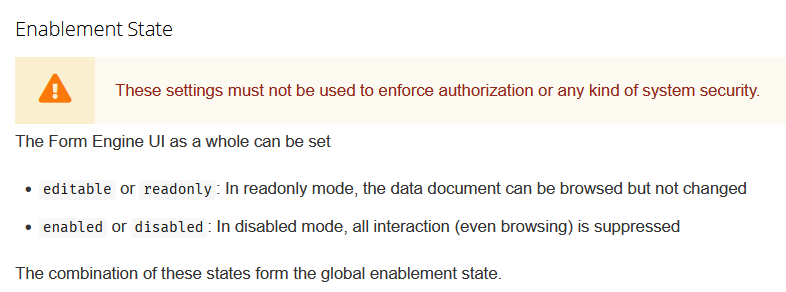
  1. nice to know that the form engine “as a whole can be set … readonly”. But HOW?
  2. The warning says the settings “must not be used to enforce authorization”. I suppose this should read “these settings alone must not… You have to secure the serveer side, too”, right?

Also: How to enhance your example of the OverviewEngine, so that the actual required access right name is not hardcoded (like “WRITE”) here, but read from an annotation on either the OverviewModel or the DocumentModel?
(There are multiple overview engines and they should have different access right configuration.)
I can get the overview model name from props, but failed to access the actual model (as it may not even be loaded at the time the overview engine is instantiated.)

  1. In my example above, I used CRUDViews for simplicity. However, in general, these views should not be modified (Redirecting…). Instead custom FormEngineViews should be used.
  1. I’m not entirely sure about the warning message, but in my opinion, you’re correct.

Once you have the overview model name, you can retrieve the overview model using something like ModelSelectors.modelByName(overviewModelName)(store.getState()) as OverviewModel.
From there, you’ll be able to access the annotations of the overview model.