Assume I have a simple document model which has 1 attachment field.
Now, in the overview of that document model I want to have a row action (button) for triggering the download of the stored attachment (if there is one).
Can I achieve that with plain A12 modelling? Or do I need to implement that in code?
Hi @anon61393032,
for dispatching such triggers as a row action you have to implement custom code for the row click by enhancing the eventHandlers prop with a custom onRowClick or if preferred as additional button as a custom onEventButtonClick (see API documentation of overview engine).
You can then handle your event by calling the triggerDownload method of your attachmentHandler (e.g. the one defined for overview engine).
Additionally if you make use of A12 Clients CRUD extension for the overview keep following in mind:
Custom default row actions are not supported by the CRUD extension.
A12 Client - CRUD Extensions
Saying that means you have to implement at least the underlaying oe view as a new view container.
import { ViewViews } from "@com.mgmtp.a12.client/client-core/lib/core/view";
<ViewViews.OverviewEngineView // ...
FYI: you can also see how to general handle custom row actions in overview engine in this contribution How to make use of Custom Row Action in an Overview?
@markus-agile-fog I have created my custom overview, used it also in the appmodel and it is working until this point:
export const DocumentOverview = (props: View) => {
  const dispatch = useDispatch();

  return (
    <ViewViews.OverviewEngineView
      {...props}
      attachmentHandler={platformServerConnectors.attachmentHandler}
      // to reproduce the "default" overview behaviour when clicking on a document
      onDocumentClick={id => {
        dispatch(
          CRUDActions.selectRow({
            activityId: props.activity.id,
            modelId: "Document",
            instanceId: id
          })
        );
      }}
      onDocumentButtonClick={(id, rowAction) => {
        if(rowAction?.event === "download_attachment") {
          const attachment = "..."; // TODO: how to get the document by id, to get the attachment from it?
          platformServerConnectors.attachmentHandler.triggerDownload(id, attachment);
        }
      }}
    />
  )
}
Where I am stuck now is how to correctly get the document from the store, by using the document’s id. I couldn’t find out how to do that. Loading it again from the backend is not a solution here.
Having the document, it should then not be difficult to get its attachment object…
@anon61393032 for myself i prefer to let these onClick functions dispatch a custom action on which you can react in a custom saga (e.g. a downloadAttachmentSaga)
then you can check if the attachenment is already stored in the overviews activity data by using this selector:
// from within a saga
const activityData = (yield* select(ActivitySelectors.data(activityId))) as Activity.Data.DocumentListData;
Now you should easily be able to find the document:
// with instance check if you like to prevent the type conversion in the upper code example
if (Activity.Data.DocumentListData.isInstance(activityData)) {
    const document = activityData.documents.find((d) => d?.id === documentId);
}
```
@markus-agile-fog thank you, that worked for a “classical” overview.
Now one step further, what if I want to have the download button within a “nested” overview, inside a CDM form?
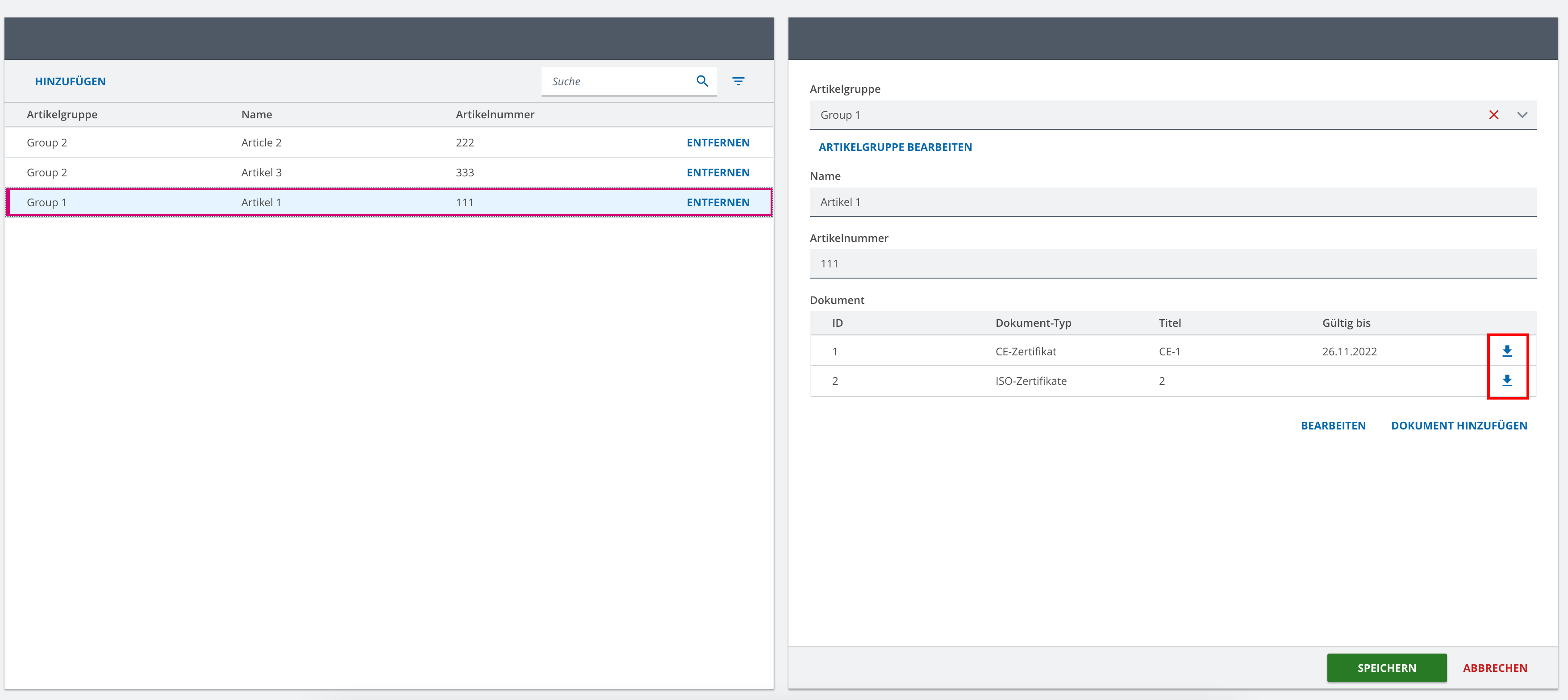
For the “classical” overview, I just replace the name with my custom overview, in the appmodel:
           "sceneChange": {
              "onEnter": [
                {
                  "type": "REGION_CLEAR",
                  "layout": {
                    "name": "MasterDetail"
                  }
                },
                {
                  "type": "VIEW_ADD",
                  "name": "DocumentOverview", // <---- this one I replaced
                  "models": [
                    {
                      "modelType": "overview",
                      "name": "Document_OVERVIEW"
                    }
                  ]
                }
              ]
            }
But where can I do the same for a nested overview inside a CDM?
@anon61393032 this nested overview is presumably a repeat of the form engine. Please open a new topic for that and I will give my answers regarding the same implementation inside form engine.
thanks in advance 