Dear Modelers & Expression Language Specialists
I have a problem with an expression that, between others, contains a string field that has ampersands ( & ) in it. It doesn’t display & but rather &
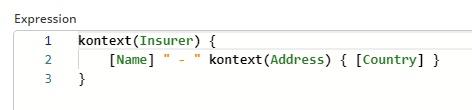
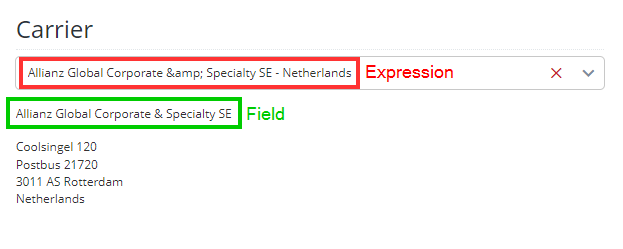
If I display the field value (in the screenshot it’s read-only and without a label) all is good, if I use it in an expression it gets escaped with &
Have you encountered this problem before?
Is it a bug?
Is there a workaround?
Any help is apreciated 
Cheers,
Bianca
Hi @bianca-firm-knoll
I’ve just tried this in the basic workspace in 2023.06-ext8 and can reproduce this.
I entered the Company name that you gave into the Companies Module and changed the Selected Items Overview so that an expression was used in the Binding.
I’ve created a bug ticket, A12-16470, to work on the solution
For other users,
The bug seems to be related to the fact that this expression is rendered in a Binding. I could not reproduce this in a “normal” Overview Model or in a Form Model expression.
And I just realized/tested that not only referencing a field with a value that contains an “&” causes the problem, but also having a plain “&” in the expression itself causes it to be replaced with &.
